Sign in

Libre University uses your GitHub account. Signing in is only needed to sit a final test, so the score is kept on your profile.

Programming

Write correct programs from nothing: values and types, decisions and loops, functions and data structures, and how to find what you got wrong.

Values, names and types

A program is a machine for turning values into other values, so the first thing worth knowing is what a value is and what the machine will do with one.

This course assumes nothing. It is worked in JavaScript, chosen because it runs everywhere without a toolchain: every example here can be pasted into a browser's developer console, or saved into a file and run with node file.js or bun file.js. The language is the vehicle. Numbers, names, types and the traps in them are the same in Python, Java, Go and Rust, and where JavaScript is unusual this course says so rather than letting you learn a local habit as a universal law.

Expressions, and the thing they leave behind

Type 3 + 4 into a console and it answers 7. That is the whole model in miniature. 3 + 4 is an expression: a piece of program text that can be evaluated. Evaluating it produces a value, 7, and the original text is then finished with. Values are what actually exist while a program runs. Expressions are only the notation you use to ask for them.

Expressions nest, and evaluation works inside out. In 2 * (3 + 4), the inner expression 3 + 4 is evaluated first to 7, and the outer one becomes 2 * 7, which evaluates to 14. Precedence decides the shape when brackets are absent: 2 + 3 * 4 is 14, not 20, because * binds tighter than +. This is the arithmetic convention and not a programming invention, but the consequences are sharper here, since a program will not tell you it read your line differently from how you wrote it. When in doubt, bracket it. Nobody has ever been confused by a redundant bracket.

console.log(...) prints a value where you can see it, and it appears in almost every example below. It is worth separating the two ideas now, because they are confused constantly by beginners: computing a value and displaying one are different acts. 3 + 4 produces 7 whether or not anybody looks. console.log(3 + 4) produces 7 and then also puts it on the screen. A program that computes correctly and prints nothing is still correct; it is merely useless. That distinction returns with force in the lesson on functions.

Numbers, all one kind

JavaScript has one numeric type. 7, 7.0, -3, 2.5 and 6.02e23 are all the same kind of thing, a number, and there is no separate integer type as there is in most languages. Every one of them is a 64 bit binary floating point value, the format standardised as IEEE 754 in 1985 and implemented in the hardware of every general purpose processor sold since.

The usual operators are +, -, *, / and %. Division always produces a number rather than truncating: 7 / 2 is 3.5, which differs from Python 2, C and Java, where dividing two integers throws the fraction away. The remainder operator % gives what is left after division, so 17 % 5 is 2, and it is the standard tool for asking whether one number divides another. Exponentiation is **, so 2 ** 10 is 1024.

Three values live in the number type that are not numbers in any ordinary sense. Infinity is what 1 / 0 gives, rather than an error. -Infinity is the other end. NaN, short for not a number, is what an arithmetic operation gives when there is no sensible answer: 0 / 0, or Math.sqrt(-1), or the result of trying to read a number out of the text "hello". NaN is contagious, in that any arithmetic touching it produces NaN again, so a single bad reading early in a calculation can silently poison every number downstream. It has one famous property: NaN === NaN is false, which is why the test for it is Number.isNaN(x) and never x === NaN.

Because a number carries 53 bits of significance, whole numbers are exact only up to 253-1, which is 9007199254740991 and is available as Number.MAX_SAFE_INTEGER. Above that, the spacing between representable values exceeds 1 and integers start to be skipped: 9007199254740992 + 1 evaluates to 9007199254740992. Database identifiers routinely exceed that range, which is why they usually arrive as strings.

Strings hold text

A string is a sequence of characters, written between single quotes, double quotes or backticks: 'hello', "hello", `hello`. The three are interchangeable for plain text, and the reason to prefer one is practical. Use whichever quote is not inside the text, so "it's fine" needs no escaping, and use backticks when you want to interpolate, which is what `Total: ${count}` does: the expression inside ${...} is evaluated and its value dropped into the text.

Strings know their length, "hello".length is 5, and support the usual operations by method call: "hello".toUpperCase() gives "HELLO", "hello".slice(1, 3) gives "el", " x ".trim() gives "x". None of these change the original. Strings in JavaScript are immutable, so every one of those methods returns a new string and leaves the old one untouched, which is why s.toUpperCase() on its own does nothing useful: you have to keep the result.

The one thing to hold on to is that "7" and 7 are different values of different types that print almost identically. That single fact is behind most of the confusion in the next section.

Booleans, and the two kinds of nothing

A boolean is true or false, and it is the type that comparison produces. 3 < 4 evaluates to true; "a" === "b" evaluates to false. Booleans are the entire subject of the next lesson, so here they are just another kind of value: they can be stored in a name, printed, and passed around like any number.

Two further values exist to mean absence, and they are not the same. undefined is what you get when nothing was ever supplied: a name declared but not assigned, a function parameter left off at the call, a property that was never set. null is a value someone chose deliberately to mean "no value here". The rough division is that undefined is the machine saying nothing was there, and null is a programmer saying nothing is meant to be there.

Both are worth naming early because they are the leading cause of a program stopping mid-run, which is the subject of the errors lesson. And JavaScript has a famous wart here: typeof null returns "object", not "null". It is a bug from the language's first implementation in 1995 that was never fixable without breaking existing pages, and it is preserved in the standard. Memorise it, because it will otherwise cost you an hour one day.

Names hold values so a later line can use them

A name is bound to a value with const or let:

const price = 40;
let count = 3;
count = count + 1;
console.log(price * count);
// 160

Read = as "becomes", never as "equals". The right side is evaluated first, all the way down to a value, and that value is then bound to the name on the left. So count = count + 1 is not an equation with no solution: it evaluates count + 1, which is 4, and rebinds count to it.

const and let differ in exactly one respect: a const name cannot be rebound afterwards, and attempting it is an error. let can be rebound as often as you like. The working habit worth forming is to reach for const first and change it to let only when you find yourself needing to reassign, because a name that never changes is one less thing to track when you are reading the code back at midnight. You will also meet var, the older declaration form, whose scoping rules are strange enough that current practice is simply not to use it.

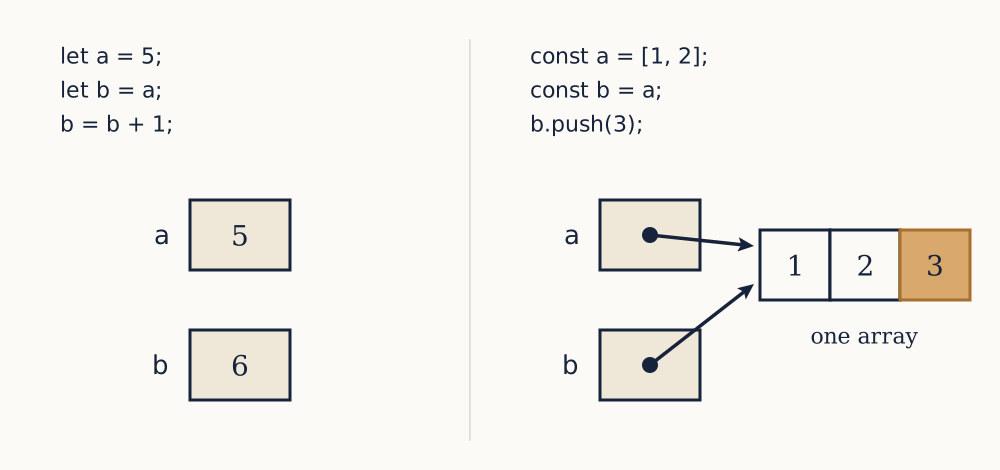
The name is not the value. Two names can hold the same number without being connected in any way:

let a = 5;
let b = a;
a = 99;
console.log(b);
// 5

b was bound to the value that a held at that moment, which was 5, and rebinding a afterwards does nothing to b. That is obvious for numbers, and this course returns to it in the lesson on references, where it stops being obvious for arrays and objects.

Example. What does this print, and why?

let x = 2;
let y = x * 3;
x = 10;
console.log(x + y);

Line by line. x is bound to 2. Then x * 3 is evaluated with the current value of x, giving 6, and y is bound to 6. Then x is rebound to 10; y is unaffected, because it holds a value and not a link to x. So x + y is 10 + 6, and the program prints 16.

Now you. What does this print?

let p = 4;
let q = p + 1;
p = q * 2;
console.log(p - q);
Answer

p is 4, so q becomes 5. Then p is rebound to q * 2, which is 10. So p - q is 10 - 5, and it prints 5.

A type decides what an operator means

Every value has a type, and the type is what decides what an operator does to it. + is the clearest case, because it means two unrelated things:

console.log(2 + 3);       // 5
console.log("2" + "3");   // "23"

Addition on numbers, concatenation on strings. Now the awkward part. When the two sides disagree, JavaScript does not stop. It coerces one side to match the other and carries on, and the rule for + is that if either side is a string, the other becomes a string too:

console.log("5" + 3);   // "53"
console.log("5" - 3);   // 2

- has no string meaning, so there the coercion goes the other way and the string becomes a number. The same line of code, one character apart, converts in opposite directions. This is the single most productive source of beginner bugs in the language, and it is worth being precise about why: numbers arriving from outside a program, from a form field, a text file, a command line argument, are strings. "5" + 3 is what a total looks like when someone forgot to convert.

Convert deliberately. Number("12.5") gives 12.5, and Number("abc") gives NaN, which is at least a value you can test for with Number.isNaN. String(12.5) gives "12.5". parseInt("12abc") gives 12, stopping at the first character it cannot use, which is occasionally what you want and more often hides a problem you would rather have seen. Check the type of anything you are unsure about with typeof, which returns a string: typeof 7 is "number", typeof "7" is "string", typeof true is "boolean".

Be clear about the limit of this section. Coercion is JavaScript's, not programming's. Python raises an error on "5" + 3; Java will not compile it. The transferable lesson is not the table of conversions but the habit underneath it: know the type of every value you handle, and convert at the point where data enters your program rather than discovering the type halfway through a calculation.

Example. A form field yields the string "20" and a discount is 5. What does "20" - 5 give, and what does "20" + 5 give?

- has no meaning for strings, so "20" is coerced to the number 20 and the result is the number 15. + sees a string on the left, so 5 is coerced to "5" and the result is the string "205". Written properly, Number("20") + 5 gives 25, and there is no ambiguity left to reason about.

Now you. What are the value and the type of each of "3" * "4", "3" + 4 and 1 + 2 + "3"?

Answer

"3" * "4" is the number 12: * has no string meaning, so both sides become numbers. "3" + 4 is the string "34". 1 + 2 + "3" is the string "33", because + groups left to right: 1 + 2 is evaluated first to the number 3, and only then does 3 + "3" concatenate.

Why 0.1 + 0.2 is not 0.3

Run it and see:

console.log(0.1 + 0.2);
// 0.30000000000000004
console.log(0.1 + 0.2 === 0.3);
// false

This is not a JavaScript defect, and the same line gives the same answer in Python, Java, C and Go. It follows from storing numbers in binary with a fixed number of bits, and the argument is short enough to give in full.

In base ten, a fraction has a terminating expansion exactly when its denominator has no prime factors besides 2 and 5. One third does not, so it is written as 0.333... and any decimal you actually write down is an approximation. Binary has only the factor 2 available, so the terminating fractions are those whose denominators are powers of two: a half, a quarter, three eighths. One tenth is not one of them, since 10 has a factor of 5. In binary, 0.1 is 0.000110011001100... with 1100 repeating forever.

A double stores 53 significant bits, so that expansion is cut off and rounded to the nearest representable value. The number that gets stored is exactly 3602879701896397/255, which you can verify: in a console, 3602879701896397 / 2 ** 55 === 0.1 returns true. As a decimal that is 0.1000000000000000055511151231257827..., slightly above a tenth. The stored value of 0.2 is likewise slightly above two tenths. Their sum, rounded again to 53 bits, lands on a value whose shortest decimal representation is 0.30000000000000004, while the nearest double to 0.3 is a shade below three tenths. Two different doubles, so === says false, correctly.

The practical consequences are three. First, never compare computed floating point values with ===. Compare with a tolerance: Math.abs(a - b) < 1e-9. Second, never store money as a fraction of a unit. Store integer pence or cents and divide only when you print, which is what every accounting system does. Third, expect the error to accumulate: adding 0.1 to itself ten times does not give 1, and a loop that steps by 0.1 will not land on its endpoint.

Example. A program computes 0.1 * 3 and needs to know whether the result is 0.3. What should it do?

0.1 * 3 evaluates to 0.30000000000000004, so === 0.3 is false and would report a correct calculation as wrong. Compare within a tolerance instead: Math.abs(0.1 * 3 - 0.3) < 1e-9 is true. The actual gap is about 5.55×10⁻¹⁷, so any tolerance from about 10-15 up to the precision the problem cares about will do.

Now you. Five items at £19.99 are totalled as 19.99 * 5, which prints 99.94999999999999. Why, and what should be stored instead?

Answer

19.99 is not exactly representable in binary, so the stored value is a hair off a hundredth, and multiplying by 5 multiplies that error by 5 too, leaving it large enough to show in the shortest decimal that identifies the result. Store the price as the integer 1999 pence, multiply to get 9995, and divide by 100 only at the moment of printing.

What a program cannot yet do

You can now compute: values of three useful types, names to hold intermediate results, and honest knowledge of where the arithmetic is approximate. What you cannot yet do is have the program behave differently on different input. Every program written with only these pieces runs the same lines in the same order and produces the same output every time.

To do more, a program has to ask a question about a value and act on the answer. Comparison already produces the right kind of value for that, a boolean, and the next lesson is about turning one into a fork in the road.
Making decisions

Everything written so far runs the same lines in the same order and produces the same answer every time, and a program that cannot vary its behaviour with its input is barely a program at all.

The previous lesson introduced the boolean, the type whose only values are true and false. This one is about where booleans come from, how they combine, and how one turns into a fork in the code. If you have arrived here directly: const and let bind names to values, === will appear throughout as the comparison operator, and console.log prints.

Comparison produces a boolean

The relational operators take two values and produce a boolean: <, >, <=, >=, and for equality === and !==. Nothing exotic happens with numbers. 3 < 4 is true, 10 >= 10 is true, 7 !== 7 is false.

The result is an ordinary value, which is worth dwelling on for a second, because beginners tend to treat a comparison as something that only exists inside an if. It does not. It can be bound to a name, printed, or passed to a function like any number:

const isAdult = age >= 18;

That is often the clearer way to write a decision, because the name says what the test means and the if beneath it then reads as English.

Two traps sit in the relational operators. The first is that they do not chain. 3 > 2 > 1 looks like a claim about three numbers and evaluates to false: 3 > 2 gives true, and then true > 1 coerces true to 1, and 1 > 1 is false. Write x > 2 && x < 5, never 2 < x < 5. The second is that < on strings compares character codes, not meaning. "apple" < "banana" is true as you would hope, but "Zebra" < "apple" is also true, because the code for Z is 90 and the code for a is 97, and every capital sorts before every lowercase. Worse, "10" < "9" is true, because comparison walks the characters and 1 comes before 9. Numbers that arrived as text and were never converted sort into an order nobody expects.

=== and the operator to leave alone

JavaScript has two equality operators, and this is one of the few places where a course should give a flat instruction rather than a balanced account. Use === and !==. Do not use == and !=.

=== is strict equality: it is true when the two values have the same type and the same value, and false otherwise. 5 === 5 is true, 5 === "5" is false, and there is nothing further to learn.

== is loose equality, which coerces before comparing, using a set of rules complicated enough that they are usually presented as a table. The reason to avoid it is not that the rules are hard but that the result is not an equality in the mathematical sense. An equality relation must be transitive: if a=b and b=c then a=c. Loose equality is not:

console.log(0 == "0");    // true
console.log(0 == "");     // true
console.log("" == "0");   // false

A relation that fails transitivity cannot be reasoned about, and any argument you make about your own code using == may simply be invalid. The exception the standard style guides allow is x == null, which is true for exactly null and undefined and nothing else, so it is a compact test for "absent by either route". Even that is clearer written out as x === null || x === undefined.

The NaN case from the previous lesson applies to both: NaN === NaN is false, and NaN == NaN is false too. Use Number.isNaN(x).

if makes a fork

An if statement takes a condition and a block, and runs the block only when the condition is true:

if (score >= 50) {
  console.log("pass");
} else {
  console.log("fail");
}

Chain further cases with else if, and note that the chain is ordered: the first matching branch runs and the rest are skipped, so the order of the tests is part of the meaning.

function grade(score) {
  if (score >= 70) return "distinction";
  if (score >= 50) return "pass";
  return "fail";
}

Write those three tests in the opposite order and every score above 70 gets "pass", because score >= 50 is true for it and matches first. That is the classic ordering bug in a grade table, and it produces no error of any kind: the program runs happily and gives the wrong answer for exactly the inputs that mattered most.

Two mechanical warnings. Always use braces, even for a one-line body, because a body without them covers only the next statement and adding a second line later silently puts it outside the if. And a stray semicolon after the condition, if (x > 0);, terminates the statement immediately, so the block that follows runs unconditionally. Both are the kind of mistake you only make once, but only after it has cost you an afternoon.

Example. A shop gives 20 per cent off orders over £100 and 10 per cent off orders over £50. What does this print for an order of 120, and what is wrong with it?

let discount = 0;
if (total > 50) discount = 0.10;
else if (total > 100) discount = 0.20;

For total = 120 the first test succeeds, so discount becomes 0.10 and the second branch is never reached. The order is wrong: the tests overlap, and in an if / else if chain the narrower condition must come first. Swap them and 120 gets 20 per cent, while 60 falls through to the second test and gets 10 per cent.

Now you. A parcel costs £3 to send under 1 kg, £5 under 5 kg, and £9 otherwise. Write the chain in the correct order, and say what an input of 0.5 gives if the tests are written largest first.

Answer
if (weight < 1) return 3;
if (weight < 5) return 5;
return 9;

Written largest first, if (weight < 5) comes before if (weight < 1), so 0.5 kg matches the 5 kg test and is charged £5 instead of £3. Every parcel under 1 kg is overcharged, and no error is ever reported.

Combining conditions

Three operators build compound conditions. && is and, true only when both sides are true. || is or, true when at least one side is true. ! is not, which flips a boolean. Precedence runs ! first, then &&, then ||, so a || b && c means a || (b && c), and again the advice is to bracket rather than to memorise.

&& and || short circuit, which means the right side is not evaluated at all when the left side already decides the answer. In a && b, if a is false the result is false whatever b is, so b is skipped. This is not an optimisation detail, it is something you rely on constantly:

if (user && user.age >= 18) { ... }

If user is undefined, reading user.age would stop the program. The && guarantees it is never read, because the left side has already settled the question. Order the two tests the other way and the program crashes on exactly the input the test was written to protect against.

There is a further subtlety worth knowing, because it explains code you will read. && and || do not return true or false; they return one of their operands. a || b returns a if a is truthy and otherwise b, which is why count || 10 is a shorthand for a default value. That shorthand has a well-known flaw: 0 || 10 is 10, so a genuine zero gets replaced by the default. The fix is ??, the nullish coalescing operator, which falls back only for null and undefined: 0 ?? 10 is 0, and null ?? 10 is 10.

Truthiness, and the six values that are not

if does not require a boolean. It accepts any value and asks whether it is truthy. The rule is a short blacklist: the falsy values are false, 0, "" the empty string, null, undefined and NaN. Everything else is truthy, including "0", "false", the empty array [] and the empty object {}.

This is convenient and it is a trap. if (name) reads as "if a name was given", and it does the right thing for undefined and for the empty string. But if (count) reads as "if there is a count" and is false when the count is legitimately zero, which is a real quantity and usually the interesting case. The habit worth forming is to write the test you actually mean: if (items.length > 0) rather than if (items.length), and if (name !== "") when that is the question.

The interaction between truthiness and loose equality produces the language's most quoted absurdity: [] is truthy, and [] == false is also true. Both are consequences of rules that are individually defensible, and together they are indefensible. Use ===, test explicitly, and the absurdity never comes up.

Negating a condition without getting it wrong

Sooner or later you have to invert a compound test, and doing it by moving the ! around is where correct conditions go to die. The rule is De Morgan's laws, which are as true in code as in logic:

¬(ab)¬a¬b
¬(ab)¬a¬b

In JavaScript: !(a && b) is the same as !a || !b, and !(a || b) is the same as !a && !b. The and becomes an or, and vice versa, and every term flips. Distributing the ! without swapping the connective is the mistake, and it produces a condition that is wrong for exactly half its inputs.

Take a real one. Access is allowed when a user is logged in and not banned: loggedIn && !banned. Access is denied when that is false, which by De Morgan is !loggedIn || banned. Reading it back, denied when they are not logged in, or when they are banned, which is plainly right. The tempting wrong answer, !loggedIn && !banned, denies access only to logged-out unbanned users, letting banned users straight through.

Example. A form is valid when the name is non-empty and the age is at least 18. Write the condition for invalid, and check it against a case.

Valid is name !== "" && age >= 18. By De Morgan the negation is name === "" || age < 18: invalid when the name is empty, or when the age is under 18. Check it on an empty name with age 40. Valid gives false && true, which is false, so it should be invalid; the negation gives true || false, which is true. Agreed.

Now you. A record is archived when it is older than a year or has been marked deleted: ageDays > 365 || deleted. What is the condition for not archived?

Answer

ageDays <= 365 && !deleted. The || becomes &&, ageDays > 365 becomes ageDays <= 365, and deleted becomes !deleted. Check it on a 400 day old record that is not deleted: archived is true || false, which is true, and the negation is false && true, which is false. Agreed.

The shape of a decision

Two idioms are worth adopting now, because they decide how readable your code is a year later.

The first is the guard clause. Deeply nested if statements are hard to read, because by the time you reach the interesting line you are holding four conditions in your head at once. Handle the exceptional cases first and leave the main path unindented:

function withdraw(account, amount) {
  if (amount <= 0) return "invalid amount";
  if (account.frozen) return "account frozen";
  if (amount > account.balance) return "insufficient funds";
  account.balance = account.balance - amount;
  return "ok";
}

Every rejection is one line, the reader can see all three at a glance, and the actual work sits at the bottom at zero indentation. Written as nested if / else blocks the same logic is four levels deep and the reader has to unwind them to answer the question "when does the money actually move".

The second is the conditional expression, or ternary, which is an if that produces a value rather than choosing a statement:

const label = count === 1 ? "item" : "items";

Use it for exactly this, choosing between two values. Nested ternaries are a known readability disaster and an if chain is better as soon as there are three cases. switch is the other tool for many cases, and it is worth knowing that its branches fall through into the next unless each ends with break, which is a defect of design responsible for a steady trickle of bugs.

Example. Rewrite this with guard clauses.

function send(message, user) {
  if (user) {
    if (user.email) {
      if (message.length > 0) {
        return "sent";
      } else {
        return "empty message";
      }
    } else {
      return "no email";
    }
  } else {
    return "no user";
  }
}

Invert each test and return early. The result is flat, and the order of the guards matters: user must be checked before user.email, or the second check stops the program when user is undefined.

function send(message, user) {
  if (!user) return "no user";
  if (!user.email) return "no email";
  if (message.length === 0) return "empty message";
  return "sent";
}

Now you. A booking is accepted when seats remain, the customer is not blocked, and the date is in the future. Write it with guard clauses returning a reason for each rejection.

Answer
function book(event, customer, date) {
  if (event.seatsLeft <= 0) return "sold out";
  if (customer.blocked) return "customer blocked";
  if (date <= today) return "date has passed";
  return "accepted";
}

Each rejection names itself, and the accepted case is the last line at zero indentation.

One fork is not enough

A program can now take a different path depending on its input, which is a real advance: grade above answers differently for 80 and for 40, and no straight-line program can do that.

The limit is that a fork is taken once. Checking whether one number is prime means trying every divisor below it, and there is no number of if statements that will do that for an unknown input, because you would have to write one per divisor and you do not know how many there are. What is needed is a way to say something once and have the machine do it many times, along with an argument that the repetition ever stops. That is the next lesson.

Loops and invariants

Deciding between two branches is a real advance, but a fork is taken once, and a great many tasks need the same work done an unknown number of times.

The previous lesson built conditions out of comparisons: age >= 18 produces a boolean, and if acts on it. A loop uses the same kind of condition for a different purpose, asking it again and again. If you have arrived here directly, the only things assumed are that let binds a name that can be rebound and that a condition in brackets is a boolean test.

Saying it once and doing it many times

The simplest loop is while. It takes a condition and a block, and it runs the block over and over for as long as the condition holds:

let i = 1;
while (i <= 5) {
  console.log(i);
  i = i + 1;
}
// 1 2 3 4 5, one per line

Three parts are doing the work, and every loop you ever write will have all three even when the syntax hides them. There is an initialisation, let i = 1, which sets the state up before the first pass. There is a condition, i <= 5, tested before each pass, so a loop whose condition is false at the start runs zero times. And there is an update, i = i + 1, which changes the state so that a later test can fail.

Leave the update out and the condition stays true forever, which is the beginner's infinite loop, and it is worth causing one deliberately in a console so you know what it looks like. Nothing is printed, nothing crashes, the program simply never returns. That symptom, a program that hangs rather than failing, almost always means a loop whose state is not changing.

The variant do { ... } while (cond); tests after the body instead of before, so it always runs at least once. It is occasionally the right shape, for reading input until it validates, and it is rare enough that most codebases contain none.

The accumulator

Printing in a loop is the least interesting thing to do in one. The pattern that actually earns its keep is the accumulator: a name declared outside the loop, updated on every pass, and read after it finishes.

let total = 0;
let i = 1;
while (i <= 100) {
  total = total + i;
  i = i + 1;
}
console.log(total);
// 5050

The declaration has to be outside. A name declared inside the block is created fresh on each pass and destroyed at the end of it, so the sum would be thrown away every time. The starting value has to be the identity for the operation you are accumulating: 0 for a sum, 1 for a product, "" for building a string. Start a product at 0 and the answer is 0 whatever the data.

That result is checkable without a machine, which is the point of using it as the first example: the sum of the first n whole numbers is n(n+1)/2, so for 100 it is 100×101/2=5050. A loop you can check against a closed form is a loop you can trust, and it is worth reaching for such a case whenever you are unsure whether your loop is right.

for, and counting from zero

The while above spread its three parts over four lines, with the update at the bottom where it is easy to forget. for collects them into one line:

let total = 0;
for (let i = 1; i <= 100; i = i + 1) {
  total = total + i;
}

Initialisation, condition, update, separated by semicolons and in that order. It is the same loop, and i = i + 1 is usually written i++, which means the same thing here. Using let inside the for header also scopes i to the loop, so it does not leak into the code after it.

Now a convention that looks arbitrary and is not. Loops over data are written to start at 0 and use a strict <:

for (let i = 0; i < n; i++) { ... }

The reasons are worth stating, because this shape is everywhere and you should know why rather than copying it. The count of passes is n, readable straight off the header with no arithmetic. The bounds are half open, 0 <= i < n, so two adjacent ranges join without a gap or an overlap: 0 to n and n to m cover everything exactly once. And it matches how arrays are indexed in the next lesson, where the first element is at position 0 and the last is at n - 1. Edsger Dijkstra wrote the classic note on this in 1982, and the argument has held: half open ranges starting at zero produce fewer off-by-one errors than any alternative.

Example. How many times does the body of for (let i = 3; i < 12; i += 2) run, and what is the value of i afterwards?

i takes the values 3, 5, 7, 9, 11, and then 13, which fails the test. So the body runs five times. In general a loop from a while i < b stepping by s runs (b-a)/s times, here 9/2=5. Afterwards i is 13, one step past the last value used, which is the value that failed the condition.

Now you. How many times does the body of for (let i = 0; i <= 20; i += 4) run, and what is i at the end?

Answer

i takes 0, 4, 8, 12, 16, 20, all of which satisfy i <= 20, then 24, which does not. The body runs six times, and i is 24 afterwards. Note that <= makes the count (20-0)/4+1 rather than (20-0)/4, which is exactly the arithmetic the strict < convention removes.

What makes a loop correct

A loop can be traced by hand for small inputs, and that is a useful thing to do, but it is not an argument that the loop is right. Tracing three cases tells you about three cases. The argument that covers all of them is the loop invariant: a claim about the state that is true before the loop starts, stays true across every pass, and is strong enough at the end to give you what you wanted.

For the sum above, the invariant is: before each test of the condition, total holds the sum of the whole numbers from 1 up to i - 1.

The argument has three parts, and it is the same three every time. Establishment: before the first test, total is 0 and i is 1, so the claim says the sum from 1 to 0 is 0, which is true of an empty sum. Maintenance: assume it holds at the top of a pass, so total is the sum to i - 1. The body adds i and increments, giving the sum to i with the new i one larger, so the claim holds at the next test. Termination: the loop ends when i <= 100 is false, and since i grows by one it fails first at exactly i = 101. Substituting into the invariant, total is the sum from 1 to 100. Which is what was wanted.

This is not academic ceremony. It is the thing to write, in a comment or on paper, when you have a loop that is nearly right and you cannot see why it is not. Almost every incorrect loop is one whose invariant is fine at the top and broken by the body, and the moment you try to state the claim you find the line that breaks it. It is also the only technique in this course that scales to loops too subtle to trace, which in the following courses means binary search and the partition step of quicksort.

Example. State the invariant for this loop and use it to say what p holds at the end.

let p = 1;
for (let k = 1; k <= 10; k++) {
  p = p * k;
}

The invariant is that before each test, p holds the product of the whole numbers from 1 to k - 1. It is established with p = 1 and k = 1, since the empty product is 1. It is maintained because multiplying by k and then incrementing keeps the claim true one step along. The loop ends at k = 11, so p is the product from 1 to 10, which is 10!=3628800.

Now you. State the invariant for this loop and say what count holds at the end, for n = 30.

let count = 0;
for (let d = 1; d <= n; d++) {
  if (n % d === 0) count++;
}
Answer

The invariant is that before each test, count holds the number of divisors of n among 1 to d - 1. It is established with count = 0 and d = 1, since there are no candidates below 1. The body adds one exactly when d divides n, maintaining it. The loop ends at d = n + 1, so count is the number of divisors of n in 1 to n, all of them. For 30 the divisors are 1, 2, 3, 5, 6, 10, 15, 30, so count is 8.

What makes a loop stop

Correctness and termination are separate arguments, and a loop can have a perfect invariant and still run forever. The termination argument needs a variant: a quantity that is a whole number, that never goes below zero, and that strictly decreases on every pass. Such a quantity cannot decrease forever, so the loop must end.

For for (let i = 0; i < n; i++), the variant is n - i. It starts at n, drops by exactly one per pass, and the loop stops when it reaches zero. That is a complete proof of termination, and for the great majority of loops it is this obvious. Where it stops being obvious is when the update is conditional, or when the bound changes inside the body, and those are exactly the loops that hang.

Be honest about the limit here, because it is a real one. Not every loop has a known variant. The Collatz loop is the standard example: start with any positive whole number, halve it if it is even, otherwise triple it and add one, and repeat until it reaches 1.

let n = 27;
let steps = 0;
while (n !== 1) {
  n = n % 2 === 0 ? n / 2 : 3 * n + 1;
  steps++;
}
console.log(steps);
// 111

Starting from 27 that takes 111 steps and climbs as high as 9232 on the way, which is not the behaviour of a quantity that decreases. Nobody has proved that this loop terminates for every starting value. It has been checked by computer for every start below about 2.95×10²⁰, a result of David Barina published in 2020, and it stopped every time, but a check is not a proof and the problem has been open since Lothar Collatz posed it in 1937. So "I ran it and it finished" is genuinely not the same claim as "it terminates", and knowing the difference is what stops you shipping a loop that hangs on the one input you did not try.

Off by one, in both directions

The commonest loop bug in any language is the off-by-one, and it comes in two flavours that are worth being able to name.

The first is the wrong comparison: writing <= where < was meant, or the reverse. for (let i = 0; i <= n; i++) runs n + 1 times, and when the body reads position i of something with n items, the last pass reads a position that does not exist. The second is the fencepost error, named for the observation that a straight fence 100 metres long with a post every 10 metres needs 11 posts and not 10. Counting the gaps when you meant the posts, or the other way around, is the same mistake as counting iterations when you meant boundaries.

There is a third that is specific to arithmetic and catches everybody once. Do not step a loop by a fraction:

let steps = 0;
for (let x = 0; x < 1; x += 0.1) {
  steps++;
}
console.log(steps);
// 11

Eleven, not ten. The previous lesson showed that 0.1 is not exactly a tenth, and ten of those slightly-off tenths add to 0.9999999999999999, which is still less than 1, so the body runs one extra time. Loop over whole numbers and compute the fraction inside: for (let k = 0; k < 10; k++) { const x = k / 10; ... }. The count is then exact by construction.

The general defence against all three is the same. Check the boundaries rather than the middle. Ask what happens on the first pass and the last, and what happens when the input is empty or has one element. That is where loops are wrong, and it is almost never in the middle.

Leaving early

Two statements interrupt the normal flow. break leaves the loop immediately, and continue skips the rest of the current pass and goes to the next test. break is the natural way to write a search that stops when it finds what it wanted:

function isPrime(n) {
  if (n < 2) return false;
  for (let d = 2; d * d <= n; d++) {
    if (n % d === 0) return false;
  }
  return true;
}

Here return does the leaving, which is even more direct than break. Two details of this loop are worth pulling out. The condition is d * d <= n rather than d <= n, because a divisor above the square root implies a matching one below it, so there is nothing left to find. For n = 97 that means eight trial divisions rather than 95. And the condition is written d * d <= n in preference to d <= Math.sqrt(n), which avoids both a repeated square root and the floating point question of what happens when n is a perfect square.

Both statements come with a caution. continue placed before the update in a while loop skips the update, which turns the loop infinite, and this is a genuinely common bug. In a for loop the update sits in the header and still runs, so the same code is safe there. Where a loop grows several breaks and continues, the honest reading is usually that it is doing two jobs and wants splitting into two.

Example. Rewrite this to leave as soon as the answer is known, and say how many passes it takes for the array [4, 9, 12, 5] looking for the first multiple of 3.

let found = -1;
for (let i = 0; i < values.length; i++) {
  if (values[i] % 3 === 0) found = i;
}

As written it keeps going and records the last match rather than the first, and it always makes n passes. Adding a break after the assignment fixes both: it stops at the first match and leaves found holding its index. For [4, 9, 12, 5] the test fails at index 0 and succeeds at index 1, so it takes two passes and found is 1. Without the break it takes four passes and found is 2.

Now you. How many passes does the isPrime loop make for n = 91, and what does it return?

Answer

d starts at 2 and the condition is d * d <= 91, so candidates run 2, 3, 4, 5, 6, 7. The tests for 2 through 6 all fail, and on the sixth pass 91 % 7 is 0, so it returns false immediately. Six passes, and 91 is not prime: it is 7×13. Had it been prime, the loop would have run through d = 9 and stopped at d = 10, since 102=100>91, making eight passes in all.

The same block, with different numbers in it

Loops are where programs start being useful, and they are also where programs start being long. Write a few and a pattern appears: the same seven lines, computing an average or checking a divisor, turn up in three places with different names in them. Copying them is how a fix in one copy fails to reach the other two.

What is needed is a way to name a computation, write it once, and call it wherever it is wanted, with a clear statement of what goes in and what comes out. That is a function, and it is next.

Functions

Write a few loops and the same seven lines start appearing in three places with different names in them, which is the point at which copying stops being cheap.

A function names a computation. You write it once, you call it wherever you want the result, and a fix reaches every caller. That much is obvious. What is not obvious, and is the real subject of this lesson, is the contract a function makes: what it takes, what it gives back, and what it touches on the way. If you have arrived here directly, all that is assumed is const, let, if and a loop.

Naming a computation

The declaration form is the one to learn first:

function celsiusToFahrenheit(c) {
  return c * 9 / 5 + 32;
}

console.log(celsiusToFahrenheit(37));
// 98.6

function opens the declaration, celsiusToFahrenheit is the name, c in brackets is the parameter, and the block is the body. Calling it is name(value). The value you pass, 37, is the argument. Parameter and argument are two ends of the same act, and the distinction is worth keeping: the parameter is the name inside the function, the argument is the value supplied at the call. Confusing them is what produces sentences like "the argument is undefined", which is usually not what the speaker means.

A function is defined once and called any number of times, and each call is independent. celsiusToFahrenheit(20) gives 68 and celsiusToFahrenheit(-40) gives -40, which is the one temperature where the two scales agree and a pleasant thing to check.

Names matter more here than anywhere else in a program, because the name is the only thing most readers will ever see. A function called calc tells you nothing; one called celsiusToFahrenheit tells you the whole contract. The working rule is that a function that answers a question gets a noun phrase for a name, totalWithTax, and one that does something gets a verb phrase, sendReceipt. If you cannot name it, you have not decided what it does, and writing the body will not help.

return gives a value back

return ends the function immediately and hands a value to whoever called it. Everything after it in that function is not executed, which is exactly what makes the guard clauses of the decisions lesson work.

The commonest confusion in a first course is between returning and printing, and it is worth being blunt about it. console.log puts text on a screen for a human. return produces a value for the rest of the program. They are not alternatives:

function addBad(a, b) {
  console.log(a + b);
}
function addGood(a, b) {
  return a + b;
}

const x = addBad(2, 3);     // prints 5, and x is undefined
const y = addGood(2, 3);    // prints nothing, and y is 5
console.log(y * 10);        // 50

addBad cannot be used in a larger expression, because the value went to the screen and nothing came back. A function with no return returns undefined, and so does one that falls off the end of its body, which is the source of a whole family of confusing failures: you call a function, get undefined, and the actual bug is a missing return several lines up. If a function is meant to answer a question, every path out of it needs a return.

There is a small syntactic trap in the same area. A return with its value on the next line is broken:

return
  a + b;    // returns undefined, always

JavaScript inserts a semicolon after a bare return, so the expression below is unreachable. Keep the value on the same line as the return.

Example. What does each of these print?

function area(w, h) {
  w * h;
}
console.log(area(3, 4));

It prints undefined. The body computes 12 and then throws it away: the line is an expression statement with no return in front of it, so the function ends without giving anything back. Adding return before w * h makes it print 12. Note that nothing warns you, because computing a value and discarding it is legal and occasionally intended.

Now you. What does this print, and why?

function bigger(a, b) {
  if (a > b) {
    return a;
  }
}
console.log(bigger(3, 9));
Answer

It prints undefined. The condition 3 > 9 is false, so the return never runs, and the function falls off the end of its body. Only one of the two paths returns a value. Adding return b; after the if fixes it, and the guard clause style would have written it as two returns from the start.

Parameters, arguments, and what happens when they disagree

JavaScript does not check the number of arguments. Call a two parameter function with one argument and the missing parameter is undefined; call it with three and the extra is discarded. Neither is an error, which is a genuine weakness of the language and a reason to be careful:

function power(base, exponent = 2) {
  return base ** exponent;
}
console.log(power(5));      // 25
console.log(power(5, 3));   // 125

A default value makes the omission deliberate rather than accidental. The default is used when the argument is undefined, including when it is left off entirely, and it is not used for null: power(5, null) gives 1, because null coerces to 0 in the arithmetic. That asymmetry is the same distinction between "nothing was supplied" and "nothing is meant to be here" from the first lesson.

Arguments are passed by value. The function receives a copy of the value, so rebinding a parameter inside the function has no effect on the caller's name:

function bump(n) {
  n = n + 1;
  return n;
}
let count = 5;
console.log(bump(count));   // 6
console.log(count);         // 5

That is the whole story for numbers, strings and booleans. It is not the whole story for arrays and objects, where the value being copied is a reference, and two names end up reaching one thing. That is a large enough trap to have its own lesson later in this course, and it is flagged here so that the rule you carry forward is "the value is copied" rather than the vaguer "the function gets its own copy of everything".

Scope: what a function can see

A name declared with let or const inside a block exists only inside that block. A function body is a block, so its parameters and its local names are invisible from outside:

function f() {
  const secret = 42;
  return secret;
}
console.log(secret);   // ReferenceError: secret is not defined

Looking a name up works outward. Inside a function, the machine looks in the function's own body, then in the block enclosing it, then outward again until it reaches the top level of the file. So a function can read a name declared outside it, and that is how it reaches other functions and shared constants.

When an inner name has the same spelling as an outer one, the inner one shadows it, and the outer one is untouched:

let n = 1;
function g() {
  let n = 2;
  return n;
}
console.log(g(), n);
// 2 1

Shadowing is not a mistake in itself and is often exactly what you want, since it means a parameter called total cannot collide with somebody else's total. It becomes a mistake when it is accidental, and it is one of the reasons to keep the number of names visible at the top level of a file small.

What else a function touches

The contract has a third clause that beginners rarely think about and everybody who has maintained a program thinks about constantly. Besides taking arguments and returning a value, a function may do something to the world: print, write a file, send a request, or change a name declared outside it. Anything of that kind is a side effect.

A function with no side effects, whose result depends only on its arguments, is called pure. celsiusToFahrenheit is pure. So is power. Pure functions have three properties worth having. They are testable, because you can call one with known inputs and compare the result to a known answer with no setup at all. They are safe to move, since calling one in a different order or a different place cannot break anything else. And they can be understood alone: everything that decides the answer is visible in the call.

Impure functions are unavoidable, since a program with no effects on the world does nothing observable. The design that survives contact with a large program is to keep them separated: put the calculation in pure functions and let a thin layer of impure code fetch the input, call them and display the output. When people say a program is testable, this is very often all they mean.

Two smaller things make a function impure in a way that surprises people. Math.random() returns a different value each call, so any function using it is impure by construction and cannot be tested by comparing against a fixed answer; the usual fix is to pass the random value in as an argument. Date.now() is the same, and a function that reads the clock will pass its tests today and fail them in a leap year.

Example. Which of these is pure, and what makes the difference?

let rate = 0.2;
function taxA(amount) {
  return amount * rate;
}
function taxB(amount, rate) {
  return amount * rate;
}

taxB is pure: everything it uses arrives as an argument, so taxB(80, 0.2) is 16 today and 16 forever. taxA reads a name from outside itself, so its answer depends on a value the caller cannot see and someone else can change. It has no side effect, but it is not pure, and it is not testable without setting up the surrounding state first. The distinction matters most when the outside name is changed by another function halfway through a run.

Now you. Say whether each is pure, and why.

function roll() {
  return Math.floor(Math.random() * 6) + 1;
}
function total(price, quantity) {
  console.log("computing");
  return price * quantity;
}
Answer

Neither. roll returns a different value for the same (empty) arguments, so it depends on something other than its inputs. total computes its answer purely but also writes to the console, which is an effect on the world; removing the console.log would make it pure. Note that the two are impure for different reasons, one in the input and one in the output, and only the second is easy to remove.

Designing the contract before the body

Writing a function well is mostly deciding three things before typing the body, and it takes about a minute.

What comes in, with the types and any restriction on them. bmi(kg, metres) takes two positive numbers. That restriction is a precondition, and you have to choose what happens when it is broken. The three honest options are to return a sentinel such as null, to throw an error, or to state in a comment that behaviour is undefined for bad input and check at the call site. What is not honest is quietly returning a number computed from nonsense, since that is how a negative weight becomes a plausible looking figure in a report.

What goes out, one thing, of one type. A function that returns a number sometimes and a string apology other times forces every caller to check which, and the checking spreads. Where two kinds of outcome genuinely exist, later lessons return an object with both, or throw.

What it touches. Ideally nothing. If it must, say so in the name: saveUser obviously writes, getUser obviously does not, and a getUser that quietly writes a cache entry is the sort of thing that costs somebody a day.

Example. Write bmi(kg, metres) returning body mass index to one decimal place, with null for non-positive input, and check it for 70 kg at 1.75 m.

function bmi(kg, metres) {
  if (kg <= 0 || metres <= 0) return null;
  return Math.round((kg / (metres * metres)) * 10) / 10;
}
console.log(bmi(70, 1.75));
// 22.9

The guard states the precondition and returns a value the caller can test for. The arithmetic is 70/1.752=22.857, which rounds to 22.9. Rounding by multiplying by 10, rounding, and dividing by 10 is the standard idiom, and the previous lesson's warning applies: the result is a floating point number and the last digit is only as exact as the format allows.

Now you. Write discountedPrice(price, percentOff) that returns the price after the discount, refuses a percentage outside 0 to 100 by returning null, and leaves the price untouched at 0 per cent. What does it give for 80 and 25?

Answer
function discountedPrice(price, percentOff) {
  if (percentOff < 0 || percentOff > 100) return null;
  return price * (1 - percentOff / 100);
}

For 80 and 25 it gives 80×0.75=60. At 0 per cent the factor is 1, so the price comes back unchanged, and at 100 per cent it is 0, both of which are worth checking because they are the boundaries. The function is pure, so those three checks are the whole test.

Functions are values too

One more fact, stated now because the next lessons lean on it. A function is itself a value: it can be bound to a name, passed as an argument, and returned from another function. Beside the declaration form there is the arrow form, which is shorter and appears constantly in real code:

const double = x => x * 2;
const add = (a, b) => a + b;

With one parameter the brackets are optional, and with a single expression as the body the braces and the return are both implied. There are differences between the two forms beyond looks, involving this, that do not matter until you write classes, and the practical advice is to use declarations for named top level functions and arrows for the small ones you pass to something else. Passing a function to another function is what the map, filter and reduce lesson is built on.

One value per name is not enough

Functions have fixed the duplication problem, and a program can now be written as a set of named computations that call each other. The limitation is in what can be passed between them.

Every name so far holds exactly one value. A function to average three numbers can take three parameters; a function to average a thousand cannot, and a function to average an unknown number of them is not expressible at all. The same wall appears anywhere data arrives in quantity, which is almost everywhere. What is needed is a single value that holds many values, in order, with a way to reach each one. That is an array, and it is next.

Arrays

A function that averages three numbers can take three parameters, and a function that averages an unknown number of them cannot be written at all with what this course has so far.

An array is one value that holds many values, in order, each reachable by its position. It is the first data structure, it is the one you will use most, and almost everything in the rest of this course is either an array or something built out of arrays. If you have arrived here directly, what is assumed is const and let, a for loop, and a function that returns a value.

Many values, one name

An array is written as a comma separated list in square brackets:

const scores = [72, 85, 91, 60, 78];
const names = ["ana", "ben", "cleo"];
const mixed = [1, "two", true, null];

Nothing requires the elements to share a type, as the third line shows, and nothing recommends it either: an array whose elements are all the same kind of thing is far easier to write a loop over, and mixing types is usually a sign that an object, two lessons ahead, is the right shape instead.

An empty array is [], and it is a perfectly good value: it is the correct answer to "which of these customers owe money" when none do, and it is the right thing to start an accumulator at when you are building a list. Note that typeof [] returns "object", which is unhelpful, so the test for an array is Array.isArray(x).

Positions start at zero

Reach an element by writing its position in square brackets:

const scores = [72, 85, 91, 60, 78];
console.log(scores[0]);   // 72
console.log(scores[2]);   // 91

The first element is at index 0, not 1. This is not an arbitrary cruelty. An index is an offset from the start of the block of memory the array occupies, so the first element sits zero places along, and the address of element i is the address of the array plus i times the size of an element. Zero based indexing makes that arithmetic exact, which is why C chose it and why nearly every language since has followed. The half open loop convention from the loops lesson exists for the same reason, and the two fit together: for (let i = 0; i < scores.length; i++) visits every element exactly once.

scores.length is the number of elements, 5 here, so the last valid index is length - 1. Reading scores[5] is the classic off-by-one, and JavaScript's response to it is one of its more dangerous choices: it does not raise an error, it returns undefined. In C the same read gives whatever byte happened to be there; in Python it raises IndexError and stops; in JavaScript your program carries on with undefined and fails four functions later, somewhere that has nothing to do with the mistake. Reach the last element with scores[scores.length - 1], and remember the symptom: an unexplained undefined is very often an index one too large.

Writing to an index works the same way, scores[0] = 100, and writing past the end extends the array rather than complaining. scores[8] = 1 on a five element array gives it a length of 9 with three empty slots in the middle, which is almost never what anybody wanted.

Growing and shrinking

Arrays are not fixed in size. Four methods change the length, and they come in a pair at each end.

push(v) adds v to the end and returns the new length. pop() removes the last element and returns it. Together they make an array into a stack, which is the structure behind undo histories and the call stack this course meets in the errors lesson.

const stack = [1, 2, 3];
stack.push(4);          // stack is [1, 2, 3, 4], returns 4
const last = stack.pop();  // last is 4, stack is [1, 2, 3]

unshift(v) and shift() do the same at the front. They are correct and they are not free: adding or removing at the front means moving every other element along one place, so the cost grows with the length of the array while push and pop do not. On a five element array that is invisible. Inside a loop over a million element array it is the difference between a second and an afternoon, and the following course on algorithms is largely about learning to see that difference before it bites.

All four mutate the array they are called on, which is to say they change it in place rather than returning a changed copy. That is worth flagging now because the string methods of the first lesson did the opposite, and array methods split into these two camps in a way that has to be memorised. push, pop, shift, unshift, splice, sort and reverse mutate. slice, concat, join, indexOf and everything in the next lesson do not.

That difference is why const on an array is not a contradiction. const scores = [...] forbids rebinding the name to a different array; it says nothing about the contents, and scores.push(9) on a const array is legal. Exactly why that is so, and what it costs you, is the lesson on references.

Walking an array

The counting loop of the earlier lesson turns into a walk over data with one change, using i as an index rather than as a value:

function mean(values) {
  if (values.length === 0) return null;
  let total = 0;
  for (let i = 0; i < values.length; i++) {
    total = total + values[i];
  }
  return total / values.length;
}
console.log(mean([72, 85, 91, 60, 78]));
// 77.2

This is the shape to have in your fingers. The accumulator is declared before the loop, the loop covers 0 to length - 1 inclusive, and the answer is read afterwards. The invariant is the one from the loops lesson with the array substituted in: before each test, total holds the sum of the first i elements. Establishment is total = 0 with i = 0, and at termination i is values.length, so total is the sum of all of them.

The guard on the first line is not decoration. The mean of nothing is not zero, it is undefined, and without the guard the function returns 0 / 0, which is NaN, which then contaminates every number computed from it. Empty is the input everybody forgets, and it is worth making a habit of asking what your function does with [] before you consider it finished.

Where the index itself is not needed, for (const v of values) reads better and cannot be given a wrong bound:

for (const v of values) {
  total = total + v;
}

Beware of for (const i in values), which is a different statement: it iterates over the keys, and for an array those keys are the strings "0", "1", "2". Using it to sum an array concatenates text instead. Use of for values, and for arrays essentially never use in.

Example. What does this print, and what is wrong with it?

const xs = [4, 8, 15];
let total = 0;
for (let i = 0; i <= xs.length; i++) {
  total += xs[i];
}
console.log(total);

It prints NaN. The condition is <=, so i takes the values 0, 1, 2 and 3. There is no element at index 3, so xs[3] is undefined, and 27 + undefined is NaN. Nothing reports an error at the moment of the bad read: the failure appears only in the final value, and it appears as a number that is not a number. Changing <= to < fixes it.

Now you. What does last hold, and what should the code have said?

const xs = [4, 8, 15, 16];
const last = xs[xs.length];
Answer

last is undefined. xs.length is 4 and the valid indices are 0 to 3, so index 4 is one past the end. The correct expression is xs[xs.length - 1], which is 16. This is the same off-by-one as the loop above, and it produces the same silent undefined rather than an error.

Finding things

Searching an array means walking it until you find what you want, and the loop is worth writing by hand once before using the built-in:

function indexOfValue(values, wanted) {
  for (let i = 0; i < values.length; i++) {
    if (values[i] === wanted) return i;
  }
  return -1;
}

Two decisions in four lines. Returning as soon as a match is found means the loop stops early, so the cost depends on where the match is rather than on the length of the array. And -1 is the answer for "not present", chosen because it is not a valid index and therefore cannot be confused with one. That convention is old and universal, and it has a matching hazard: -1 is truthy, so if (indexOfValue(xs, v)) is true when the value is absent and false when it is at index 0, which is precisely backwards. Test !== -1 explicitly.

The built-in versions are values.indexOf(wanted), identical to the above, and values.includes(wanted), which returns a boolean and is what you want when the position does not matter. They differ in one corner: indexOf compares with ===, so it can never find NaN, while includes uses a comparison that can. [NaN].indexOf(NaN) is -1 and [NaN].includes(NaN) is true.

While on built-ins, one trap deserves its own paragraph because it is the most surprising default in the language. sort() with no argument converts every element to a string and sorts those:

console.log([10, 9, 1, 2].sort());
// [1, 10, 2, 9]

That is correct alphabetical order for "1", "10", "2", "9", and it is nonsense as an order for numbers. To sort numbers you must supply a comparison function, which takes two elements and returns a negative number, zero or a positive number:

console.log([10, 9, 1, 2].sort((a, b) => a - b));
// [1, 2, 9, 10]

sort also mutates the array it is called on, so sorting inside a function changes the caller's array. [...values].sort((a, b) => a - b) sorts a copy and leaves the original alone.

Example. What is wrong with this check, and what does it do for each of the three names?

const names = ["ana", "ben", "cleo"];
if (names.indexOf("ana")) console.log("found");

indexOf("ana") returns 0, which is falsy, so nothing is printed even though the name is there. For "ben" it returns 1, which is truthy, so it prints; for "dave" it returns -1, which is also truthy, so it prints for a name that is absent. The test is right for exactly one of the three cases and wrong for the other two. Write if (names.indexOf("ana") !== -1), or better if (names.includes("ana")).

Now you. const ages = [30, 9, 100, 25]; What does ages.sort() give, and what is needed to sort them as numbers?

Answer

ages.sort() gives [100, 25, 30, 9], because the elements are compared as the strings "100", "25", "30", "9" and "1" sorts before "2". A comparison function is needed: ages.sort((a, b) => a - b) gives [9, 25, 30, 100]. Both calls also reorder ages itself, so if the original order mattered, sort a copy.

Building a new array from an old one

The other basic shape, alongside accumulating a single value, is producing a new array. The accumulator starts as [] and the body pushes:

function evens(values) {
  const out = [];
  for (const v of values) {
    if (v % 2 === 0) out.push(v);
  }
  return out;
}
console.log(evens([1, 2, 3, 4, 5, 6]));
// [2, 4, 6]

Building a new array rather than deleting from the old one is worth adopting as a default. Removing elements from an array while looping over it is a classic source of skipped elements: splice shifts everything after the removal down by one, so the index that was about to be visited now holds a value that has never been seen, and the loop steps straight past it. Building fresh has no such problem, and the original stays available if it turns out you needed it.

Example. Write a function returning the largest value in an array, with null for an empty one. What is the invariant, and what does it give for [3, 9, 2]?

function largest(values) {
  if (values.length === 0) return null;
  let best = values[0];
  for (let i = 1; i < values.length; i++) {
    if (values[i] > best) best = values[i];
  }
  return best;
}

The invariant is that before each test, best holds the largest of the first i elements. It is established by taking values[0] and starting at i = 1, which is why the loop starts at 1 rather than 0. For [3, 9, 2]: best starts at 3, becomes 9, and 2 does not beat it, so the answer is 9. Note that starting best at 0 instead would be a bug, giving 0 for an array of negative numbers.

Now you. Write a function that returns a new array of the squares of the values it is given, and say what it returns for [].

Answer
function squares(values) {
  const out = [];
  for (const v of values) {
    out.push(v * v);
  }
  return out;
}

For [] the loop body never runs and it returns [], which is the right answer: the squares of no numbers are no numbers. Unlike mean, this function needs no guard, because the empty case falls out correctly. Deciding which of the two situations you are in is part of writing any function over an array.

Three shapes, over and over

Look at the three loops in this lesson side by side. mean walks the array and combines everything into one value. evens walks it and keeps some of the elements. squares walks it and replaces each element with something computed from it. Every array loop you write for the rest of your life will be one of those three, or a combination of them, and the proportion is not close: they cover the great majority of real code.

Because they are so common they have names, and methods that say the name in the first word instead of leaving the reader to work it out from the tenth line. That is the next lesson.

Map, filter and reduce

Nearly every loop over an array does one of three things, and a reader has to get to the tenth line before finding out which.

The previous lesson wrote all three by hand: a walk that combines everything into one value, a walk that keeps some of the elements, and a walk that replaces each element with something computed from it. This lesson gives them their names and their methods. If you have arrived here directly, what is assumed is an array, a for loop over one, and the fact from the functions lesson that a function is itself a value and can be passed as an argument.

A function passed to a function

All three methods work the same way: you hand them a function, and they call it for you, once per element. A function passed to another function like this is a callback.

const double = x => x * 2;
console.log([1, 2, 3].map(double));
// [2, 4, 6]

map did the walking, double did the deciding, and the two are separated. That separation is the whole idea. The walking is identical every time and is now written once, inside the language; the only part that varies from case to case is the small function you supply, and it sits in one place where a reader can see it.

The callback is usually written inline as an arrow function, since it is rarely wanted anywhere else:

console.log([1, 2, 3].map(x => x * 2));

Two facts about the call are worth knowing now, because both cause bugs. The callback is given three arguments, not one: the value, the index, and the whole array. You may ignore the ones you do not need, and almost always do. But a callback that accepts more parameters than you intended will receive them, which produces the single most quoted trap in the language:

console.log(["1", "2", "3"].map(Number));
// [1, 2, 3]
console.log(["1", "2", "3"].map(parseInt));
// [1, NaN, NaN]

Number takes one argument and ignores the rest. parseInt takes two, the text and the number base, so it is called as parseInt("2", 1), and base 1 is not a legal base. The fix is to write the callback you meant, x => parseInt(x, 10), and the general lesson is to be deliberate about how many arguments a callback accepts.

map: same length, each element transformed

map calls the function on every element and collects the results into a new array of the same length, in the same order. That length guarantee is the thing to hold on to: a map cannot drop an element and cannot add one.

const scores = [72, 85, 91, 60, 78];
console.log(scores.map(s => s + 5));
// [77, 90, 96, 65, 83]

The original array is untouched. map is not a mutating method, and scores still holds its five original values afterwards, which is a large part of why these methods are pleasant to use: a chain of them cannot quietly corrupt the data it started from.

The commonest misuse is trying to filter with it. A callback that returns nothing for the elements you want to skip does not skip them; it returns undefined for them, because map always produces one output per input, and you end up with an array full of holes. If the length should change, map is the wrong method.

filter: same elements, fewer of them

filter calls the function on every element and keeps the ones for which it returns a truthy value. The callback is a predicate: a function whose job is to answer yes or no.

console.log(scores.filter(s => s >= 70));
// [72, 85, 91, 78]

Elements are kept unchanged, so a filter can only shorten. If nothing passes, the result is [], not null, which is one of the reasons the empty array is a value worth being comfortable with: code downstream of a filter has to work when nothing matched, and an empty array flows through the rest of a pipeline without special handling.

The truthiness rules from the decisions lesson apply here in full, so a predicate that returns a number rather than a boolean will behave in ways you did not intend when that number is 0. Return a comparison.

Three relatives are worth knowing, because reaching for filter when you want one of them is wasteful and less clear. find returns the first matching element, or undefined. findIndex returns its position, or -1. some and every return booleans: whether at least one element passes, and whether all of them do. All four stop as soon as the answer is settled, while filter always walks the whole array.

Example. From scores, produce an array of the passing scores expressed as percentages of 120, rounded to one decimal place. What comes out?

const passing = scores.filter(s => s >= 70);
const asPercent = passing.map(s => Math.round((s / 120) * 1000) / 10);
console.log(asPercent);
// [60, 70.8, 75.8, 65]

Filter first, then map: the order matters for cost, since mapping first would convert the score of 60 that is about to be discarded. The arithmetic on the first element is 72/120=0.6, which is 60 per cent exactly, and on the second 85/120=0.70833 to five places, which rounds to 70.8.

Now you. From [3, 8, 12, 5, 20], produce the squares of the values above 6. What is the result, and what would you get if you mapped before filtering with the same predicate?

Answer
console.log([3, 8, 12, 5, 20].filter(v => v > 6).map(v => v * v));
// [64, 144, 400]

Mapping first gives [9, 64, 144, 25, 400], and filtering that with v > 6 keeps every one of them, since all five squares exceed 6. The result would be wrong, not merely slower: a predicate written for the original values does not mean the same thing applied to transformed ones.

reduce: many values into one

reduce is the general one, and the only one of the three that people find genuinely hard on first meeting. It walks the array carrying an accumulator, and its callback takes two arguments, the accumulator so far and the current element, and returns the new accumulator.

console.log([1, 2, 3, 4].reduce((total, v) => total + v, 0));
// 10

Compare it against the hand written version from the previous lesson and the pieces line up exactly:

let total = 0;
for (const v of [1, 2, 3, 4]) {
  total = total + v;
}

The 0 at the end of the reduce call is the initial value, corresponding to let total = 0. The arrow is the body. reduce supplies the loop. Nothing has been added, and the only thing removed is the mutable name.

Always pass the initial value. It is optional, and leaving it off makes reduce use the first element as the starting accumulator and begin at the second. That works for a sum of a non-empty array and fails in two ways. On an empty array it throws: [].reduce((a, b) => a + b) gives TypeError: reduce of empty array with no initial value, while the same call with , 0 returns 0. And when the accumulator is a different type from the elements, as when counting or building a string, the first element is not a valid accumulator at all.

Choosing the initial value is the same question as choosing an accumulator's starting value in a hand written loop: it is the identity for the operation. 0 for a sum, 1 for a product, "" for text, [] for a list. For a maximum there is no natural identity, so -Infinity serves, or you take the first element and guard the empty case as the previous lesson's largest did.

reduce can express map and filter too, since anything that walks an array carrying state can be written as a reduce. That is a fact about its generality and not a recommendation. xs.reduce((out, v) => [...out, v * 2], []) is a map written in a way that hides what it does and copies the whole array on every step, and code review exists partly to catch it.

Example. Compute the mean of the passing scores in [72, 85, 91, 60, 78] using filter and reduce, and check it by hand.

const passing = scores.filter(s => s >= 70);
const mean = passing.reduce((a, s) => a + s, 0) / passing.length;
console.log(mean);
// 81.5

The passing scores are 72, 85, 91 and 78, which sum to 326, and 326/4=81.5. The guard the previous lesson insisted on is still needed: if nothing passed, passing.length is 0 and the mean is NaN. A filter followed by a division is one of the places an empty array actually turns up in practice.

Now you. Using reduce, count how many values in [4, 7, 10, 3, 8] are greater than 5. What is the initial value and why?

Answer
console.log([4, 7, 10, 3, 8].reduce((n, v) => v > 5 ? n + 1 : n, 0));
// 3

The initial value is 0, because the accumulator is a count and the count of nothing is zero. Note that the accumulator is a number while the elements are also numbers, which makes it tempting to leave the initial value off; doing so would start the accumulator at 4, the first element, and give 7 instead of 3.

Pipelines

Because map and filter return arrays, they chain, and a sequence of steps can be written as a sequence of steps:

const total = orders
  .filter(o => o.paid)
  .map(o => o.amount)
  .reduce((sum, a) => sum + a, 0);

Read top to bottom: keep the paid orders, take their amounts, add them up. The equivalent loop is six lines with a mutable accumulator and an if, and it says the same thing in an order the reader has to reconstruct. The convention of one step per line, indented under the source, is worth adopting: it makes a chain of four steps as readable as a list of four instructions.

The habit to build alongside it is to name the intermediate results when the chain gets long or the steps are not obvious. Three anonymous steps are fine; six are a wall. const paid = orders.filter(o => o.paid); costs one line and gives the reader a foothold.

When a loop is still the right answer

These methods are not universally better, and treating them as a style rule rather than a tool produces its own kind of unreadable code. Four cases favour a plain loop.

Stopping early. map and filter always walk the whole array. If you want the first match, find is the right tool, and if you want something more complicated than a first match, a loop with a break is clearer than any chain.

Several results from one walk. Computing the minimum, the maximum and the sum with three chained calls walks the array three times and reads as three unrelated facts. One loop that computes all three is faster and says plainly that they belong together. The cost matters only for large arrays, and the clarity argument applies at any size.

Index arithmetic. Anything comparing an element to its neighbour, or stepping two at a time, or walking backwards, wants an index, and forcing it through reduce produces something nobody can read.

Side effects. If the point of the walk is to print, write or send, use for ... of. Using map and discarding the array it built is a misuse that misleads the reader about what the code is for, and forEach exists for exactly this case.

The honest summary is that map and filter earn their place almost always, reduce earns it for sums, counts and grouping and loses it for anything more elaborate, and a loop is never wrong, only sometimes noisier.

Example. Rewrite this loop as a pipeline, then say whether the rewrite is an improvement.

let count = 0;
for (const w of words) {
  if (w.length > 3) count = count + 1;
}
const count = words.filter(w => w.length > 3).length;

An improvement: it is one line, it has no mutable name, and it says "how many words are longer than three characters" in the order a person would say it. The one cost is an intermediate array that is built and then thrown away for its length, which is irrelevant for anything under a few hundred thousand words.

Now you. Rewrite this as a pipeline, and say why the loop might still be preferred if values is very large.

let sum = 0;
for (const v of values) {
  if (v > 0) sum = sum + v * v;
}
Answer
const sum = values.filter(v => v > 0).map(v => v * v).reduce((a, b) => a + b, 0);

The chain walks the data three times and allocates two intermediate arrays, while the loop walks it once and allocates nothing. For a few thousand values the difference is invisible and the chain is clearer. For tens of millions it is a real cost, and the loop, or a single reduce doing both steps, is the better trade.

A position is a poor name for a field

The three shapes have covered every example so far because every example has been a list of numbers, where an element's meaning is obvious from the array it is in. Real data is not like that. A person is a name, an age and an email, and storing them as ["ana", 34, "[email protected]"] means writing person[1] for the age and remembering forever that 1 means age. Insert a field at the front and every index in the program is wrong, silently.

What is wanted is a value whose parts are reached by name rather than by position. That is an object, and it is next.

Objects and nested data

An array reached by position is fine for a list of scores and hopeless for a person, because remembering that index 1 means the age is a job the machine should be doing.

An object stores values under keys, so a record says person.age and stays right when a field is added. If you have arrived here directly, what is assumed is arrays, for ... of, and functions that return values. This is also the lesson where recursion appears, and it appears because nested data forces it rather than as a puzzle for its own sake.

Values under keys

An object literal is written in braces, as key: value pairs:

const person = {
  name: "Ana",
  age: 34,
  email: "[email protected]"
};
console.log(person.age);
// 34

The keys are name, age and email, and the values can be anything at all: numbers, strings, arrays, other objects, functions. An object with a function as a value is how methods work, which is why "hello".toUpperCase() and [1,2].push(3) have the shape they do.

Compare the two ways of writing the same record. As an array it is ["Ana", 34, "[email protected]"], and the age is person[1]. As an object the age is person.age. The array version is shorter to type and worse in every other way: it requires the reader to know the convention, it breaks silently everywhere if a field is inserted at the front, and it makes a mistyped index into a wrong value rather than an obvious error. The general rule is that positions are for things of the same kind, where order carries meaning, and keys are for things of different kinds, where the name carries it.

Empty objects are useful in the same way empty arrays are. {} is the natural starting accumulator when you are building a set of counts, which is a pattern this lesson gets to shortly.

Dot, bracket, and the missing key

There are two ways to reach a value, and they are not interchangeable:

console.log(person.age);       // 34
console.log(person["age"]);    // 34

const field = "age";
console.log(person[field]);    // 34
console.log(person.field);     // undefined

Dot notation takes a literal key written into the source. Bracket notation takes an expression that evaluates to a key, so it is what you use when the key is in a variable, comes from user input, or is being built. person.field looks for a key literally called "field", does not find one, and gives undefined. That confusion is worth a minute now because it costs an hour later.

Reading a key that does not exist gives undefined rather than an error, exactly as reading past the end of an array does, and with the same consequence: the failure surfaces later and somewhere else. Reading a key of undefined does raise an error, and this is the most common way for a JavaScript program to stop:

console.log(person.address.city);
// TypeError: undefined is not an object (evaluating 'person.address.city')

person.address is undefined, and undefined has no properties, so the second dot fails. The exact wording varies between engines, but the shape is always the same and it names the property it was trying to read, which is your first clue about where to look.

Three defences exist, in increasing order of preference. Test first, if (person.address), which the short circuiting of && makes compact. Use optional chaining, person.address?.city, which evaluates to undefined when the left side is null or undefined instead of throwing. Or fix the data, so that a person always has an address object even when it is empty. The third is best where you control the shape, because it removes the question rather than answering it repeatedly.

Adding and changing are the same operation, person.city = "Lisbon", and delete person.email removes a key entirely. To ask whether a key is present, "email" in person gives a boolean and is more precise than checking the value against undefined, since a key can be present with the value undefined.

Finally, three functions turn an object back into arrays so the previous lesson's methods apply: Object.keys(person) gives ["name", "age", "email"], Object.values gives the values, and Object.entries gives an array of [key, value] pairs. One quirk to know: object keys are always strings. Writing counts[1] = "x" stores it under the key "1", and Object.keys returns ["1"].

Example. What does each line print?

const config = { host: "localhost", port: 8080 };
const key = "port";
console.log(config.port);
console.log(config[key]);
console.log(config.key);
console.log(config.timeout);

8080, then 8080, then undefined, then undefined. The third is the dot-versus-bracket confusion: config.key asks for a key spelled key, which does not exist. The fourth is an ordinary missing key. Both give undefined with no error, which is why a program that reads configuration usually checks for the keys it needs rather than trusting them.

Now you. Given const order = { id: 7, customer: { name: "Ben" } };, what do order.customer.name, order.customer.email and order.payment.method each give?

Answer

"Ben", then undefined, then a TypeError. The second reads a missing key of an object that exists, which is merely absent. The third reads a key of order.payment, which is undefined, and undefined has no properties, so the program stops. order.payment?.method would give undefined instead of throwing.

Arrays of objects

Almost all real data is an array of objects: rows from a database, items in a basket, results from a request. It is the shape worth being fluent in, because everything from the previous lesson applies to it directly.

const orders = [
  { id: 1, customer: "Ana", amount: 40, paid: true },
  { id: 2, customer: "Ben", amount: 25, paid: false },
  { id: 3, customer: "Ana", amount: 60, paid: true }
];

const paidTotal = orders
  .filter(o => o.paid)
  .map(o => o.amount)
  .reduce((sum, a) => sum + a, 0);
console.log(paidTotal);
// 100

The pipeline is the one from the previous lesson, and the only new thing is that each element is a record with named fields, which makes each step readable without a comment.

The pattern that turns up constantly and is worth memorising is grouping, or counting, into an object:

const counts = {};
for (const o of orders) {
  counts[o.customer] = (counts[o.customer] ?? 0) + 1;
}
console.log(counts);
// { Ana: 2, Ben: 1 }

The ?? 0 supplies the starting value the first time a customer is seen. Using || there would work for a count and break for a total, because a legitimate running total of 0 is falsy and would be replaced. This is the case the nullish operator exists for.

Example. From orders, produce an object mapping each customer to their total amount, and check it.

const totals = {};
for (const o of orders) {
  totals[o.customer] = (totals[o.customer] ?? 0) + o.amount;
}
console.log(totals);
// { Ana: 100, Ben: 25 }

Ana has orders of 40 and 60, so 100; Ben has one of 25. Note that this counts unpaid orders too, since no filter was applied; whether that is right depends on the question, and it is the kind of thing worth stating in the function's name, totalsByCustomer against paidTotalsByCustomer.

Now you. Using the same orders, produce an object mapping each customer to the number of their unpaid orders, and say what it gives.

Answer
const unpaid = {};
for (const o of orders.filter(o => !o.paid)) {
  unpaid[o.customer] = (unpaid[o.customer] ?? 0) + 1;
}
console.log(unpaid);
// { Ben: 1 }

Only order 2 is unpaid, so Ben has 1 and Ana does not appear at all. That absence is worth noticing: unpaid.Ana is undefined, not 0, so any code reading these counts has to handle a missing key, which ?? 0 again does.

JSON, and data as text

Data that leaves a program has to become text, because that is what a file holds and what a network carries. JSON, JavaScript Object Notation, is the format nearly everything uses, and it is deliberately a small subset of what JavaScript can write: objects, arrays, strings, numbers, true, false and null. Keys must be in double quotes and trailing commas are forbidden.

JSON.stringify(value) turns a value into text and JSON.parse(text) turns it back. The round trip is not lossless, and the losses are worth knowing before they surprise you:

console.log(JSON.stringify({ a: 1, b: undefined, c: [1, 2] }));
// {"a":1,"c":[1,2]}

undefined is dropped, as are functions. A Date becomes a string and does not become a Date again on the way back. NaN and Infinity become null. And JSON.parse throws on malformed input rather than returning null, which is a good default and means anything reading a file or a response needs the error handling of the next lesson.

When the keys are data

An object works well when the keys are field names you wrote yourself. It works less well when the keys are data: user identifiers, arbitrary words, values from a file. Three reasons, in order of how often they bite.

Keys become strings, so the number 1 and the string "1" collide, and any key that is not a string is silently converted. Every object inherits a handful of properties from the language, so a lookup for the key "constructor" finds something even in an object you have just created and filled yourself. And there is no cheap way to ask how many keys there are without building an array of them.

Map fixes all three. It is a separate structure with its own methods, keys of any type including objects, a size property, and no inherited keys:

const seen = new Map();
seen.set("ana", 3);
seen.set(2, "two");
console.log(seen.get(2), seen.size, seen.has("ana"));
// two 2 true

The working rule: plain objects for records with known fields, Map for lookup tables whose keys come from data. Set, its sibling, holds unique values with fast membership tests, which is the right structure for "have I seen this before" and much faster than includes on a growing array.

Nesting, and the walk that needs recursion

Objects hold objects, which hold arrays of objects. A folder contains files and folders; a comment has replies which have replies; a company has departments which have teams. Such a shape has no fixed depth, and that is what defeats every loop written so far. A loop with one index visits one level. Two nested loops visit two. There is no number of nested loops that visits an unknown number of levels, for the same reason there was no number of if statements that could check an unknown number of divisors.

The way out is for a function to call itself. A recursive function has two parts, and getting either wrong is the whole of the difficulty. The base case is an input small enough to answer directly, with no further call. The recursive case breaks the problem into smaller pieces of the same shape, calls itself on each, and combines the results. Each call must move strictly towards the base case, which is the same variant argument that made a loop terminate.

const tree = {
  name: "root", size: 0, children: [
    { name: "a", size: 3, children: [] },
    { name: "b", size: 0, children: [
      { name: "c", size: 5, children: [] },
      { name: "d", size: 7, children: [] }
    ] }
  ]
};

function totalSize(node) {
  let sum = node.size;
  for (const child of node.children) {
    sum = sum + totalSize(child);
  }
  return sum;
}
console.log(totalSize(tree));
// 15

The base case is hiding in plain sight: a node with no children has an empty children array, so the loop body never runs and the function returns node.size without calling itself. That is the shape to look for, since an explicit if is often unnecessary when the empty collection already stops the descent. The answer checks by hand: 0+3+(0+5+7)=15.

Trust the recursive call. The commonest reason people find recursion hard is that they try to trace every level in their head, which is exactly as hopeless as tracing a loop over a million elements. The argument that works is the one from loop invariants, run inductively: assume totalSize(child) returns the correct total for that child's whole subtree, and then check that the line combining those returns is right. Base case correct, plus combining step correct, gives correct for every depth.

The limit is real and worth stating. Each call occupies space on the call stack, and a recursion too deep for it fails with a stack overflow, which in Node is typically somewhere around ten thousand frames deep. That is far more than any folder tree and far less than a list of a million items, so recursion is the right tool for shapes that branch and the wrong one for long flat sequences. The following course on algorithms takes this much further.

Example. Write a function that counts the leaves of such a tree, where a leaf is a node with no children, and check it against tree.

function countLeaves(node) {
  if (node.children.length === 0) return 1;
  let n = 0;
  for (const child of node.children) {
    n = n + countLeaves(child);
  }
  return n;
}
console.log(countLeaves(tree));
// 3

Here the base case has to be explicit, because a leaf contributes 1 rather than 0 and the empty loop would return the wrong value. The leaves are a, c and d, so 3 is right, and root and b contribute nothing themselves.

Now you. Write a function returning the depth of the tree, counting the root as depth 1. What does it give for tree?

Answer
function depth(node) {
  if (node.children.length === 0) return 1;
  let deepest = 0;
  for (const child of node.children) {
    const d = depth(child);
    if (d > deepest) deepest = d;
  }
  return 1 + deepest;
}
console.log(depth(tree));
// 3

A leaf has depth 1, and any other node is one deeper than its deepest child. For tree: a is 1, c and d are 1, so b is 2, and the root is 3. The deepest accumulator is the largest function from the arrays lesson, starting at 0 rather than at the first element because the recursive case is only reached when there is at least one child.

Two names, one value

Objects and arrays complete the toolkit: values, decisions, loops, functions, sequences and records, and enough to write a real program.

They also introduce something not yet said out loud, and it is the reason the rest of this course is about being wrong. When an array or an object is assigned to a second name, or passed to a function, the thing copied is not the data. Two names end up reaching the same value, and a change made through one is visible through the other. That produces bugs which cannot be found by reading the line that misbehaves, because the line that misbehaves is not the line that caused it. That is next.

References and mutation

Every bug so far has been findable by reading the line that misbehaved, and this lesson is about the first kind that is not.

The first lesson made a promise it has to qualify. let b = a copies the value held by a into b, and for a number that is the end of the story. For an array or an object the value being copied is a reference, a way of reaching the data rather than the data itself, and copying it leaves two names reaching one thing. If you have arrived here directly, what is assumed is arrays, objects and functions with parameters.

What assignment actually copies

Start with the case that behaves as expected:

let a = 5;
let b = a;
b = b + 1;
console.log(a, b);
// 5 6

Numbers, strings, booleans, null and undefined are primitives. The value itself is what is stored under the name and what is copied on assignment, so a and b are independent from the moment b is created. Nothing you can do to b reaches a, and this is guaranteed by the fact that primitives have no parts you can change: there is no operation that alters the number 5 into something else.

Now the same shape with an array:

const a = [1, 2];
const b = a;
b.push(3);
console.log(a);
// [1, 2, 3]
console.log(a === b);
// true

a and b are two names for one array. The assignment copied a reference, and push went through that reference to the single array both names reach. Nothing was copied that mattered.

The mental picture worth carrying is that the array lives somewhere in memory of its own, and a name holds a note saying where. Assignment copies the note, not the thing the note points to. This is not a JavaScript peculiarity: it is exactly how Python, Java, Ruby and C# behave for their equivalent types, and understanding it once carries everywhere.

Two consequences follow immediately. === on arrays and objects compares identity, not contents: [1, 2] === [1, 2] is false because those are two separate arrays, while a === b above is true because there is only one. There is no built-in operator for "same contents", and comparing two objects field by field is something you write yourself or take from a library.

Why const does not freeze

The previous lessons said const prevents rebinding, and were precise for a reason:

const scores = [1, 2];
scores.push(3);      // fine, scores is [1, 2, 3]
scores = [4, 5];     // TypeError: Assignment to constant variable

const protects the note, not the thing. It guarantees that the name will always reach the same array, and says nothing about what is in it. That is why const is the right default for arrays and objects even when you intend to change their contents, and why const on its own is no defence against the bugs in this lesson.

Object.freeze(obj) does prevent changes, and comes with a warning that will be familiar by the end of this lesson: it is shallow. It stops assignments to the object's own keys and does nothing about objects nested inside it.

const f = Object.freeze({ a: 1, b: { c: 2 } });
f.b.c = 9;
console.log(f.a, f.b.c);
// 1 9

The write to f.a fails, throwing in strict mode and silently doing nothing outside it, while the write to f.b.c succeeds because the inner object was never frozen.

Passing to a function

The functions lesson said arguments are passed by value, and that is still true: the function gets a copy of the reference. Which means it cannot rebind the caller's name and can absolutely change the caller's data.

function addItem(list, item) {
  list.push(item);
}
function replaceList(list) {
  list = ["new"];
}

const basket = ["apple"];
addItem(basket, "pear");
replaceList(basket);
console.log(basket);
// ["apple", "pear"]

addItem reached through the reference and changed the one array. replaceList rebound its own parameter to a different array, which the caller never sees, and did nothing at all. Beginners frequently expect the opposite of both.

The dangerous version of this is a function that mutates by accident, and the usual culprit is sort:

function topThree(values) {
  return values.sort((a, b) => b - a).slice(0, 3);
}
const scores = [72, 85, 91, 60, 78];
console.log(topThree(scores));   // [91, 85, 78]
console.log(scores);             // [91, 85, 78, 72, 60]

topThree looks like a question, its name is a noun phrase, and it silently reorders the caller's array. Any code afterwards that assumed the original order is now wrong, and there is nothing at the failing line to suggest that topThree was responsible. Sorting a copy, [...values].sort(...), fixes it and costs one line.

Example. What does this print?

const original = [1, 2, 3];
const copy = original;
copy[0] = 99;
const other = [1, 2, 3];
console.log(original[0], original === copy, original === other);

99, then true, then false. copy is another name for the same array, so writing through it is visible through original. other has the same contents and is a different array, so === is false. The two comparisons together are the whole lesson: identity, not contents.

Now you. What does this print, and how would you make scale leave its argument alone?

function scale(values, factor) {
  for (let i = 0; i < values.length; i++) {
    values[i] = values[i] * factor;
  }
  return values;
}
const prices = [10, 20];
const doubled = scale(prices, 2);
console.log(prices, doubled, prices === doubled);
Answer

It prints [20, 40] [20, 40] true. The loop writes through the reference, so the caller's array is changed and the returned array is the same one. To leave the argument alone, build a new array instead: return values.map(v => v * factor);, which returns a fresh array of the same length and touches nothing.

Copying, and how far the copy goes

Three ways to copy are worth knowing, and all three share one limitation.

For an array, [...values] or values.slice() produces a new array with the same elements. For an object, { ...obj } or Object.assign({}, obj) produces a new object with the same keys and values. These are shallow copies: the new container is genuinely new, and the values inside it are copied by the same rule as any assignment, so a nested array or object is shared rather than duplicated.

const orig = { name: "Ana", address: { city: "Lisbon" } };
const copy = { ...orig };
copy.name = "Ben";
copy.address.city = "Porto";
console.log(orig.name, orig.address.city);
// Ana Porto

The top level worked: orig.name is untouched. One level down it did not, because copy.address and orig.address are the same object. This is the single most common way for a "copy" to fail to be one, and the symptom is exactly the sort described at the top of this lesson: something changes that nobody wrote a line to change.

A deep copy duplicates every level. The modern way is structuredClone(value), built into browsers and into Node since version 17:

const deep = structuredClone(orig);
deep.address.city = "Madrid";
console.log(orig.address.city, deep.address.city);
// Porto Madrid

The older idiom, JSON.parse(JSON.stringify(value)), also produces a deep copy and carries all the JSON losses from the previous lesson: a Date comes back as a string, undefined values and functions vanish, and NaN becomes null. It also fails outright on a structure containing a cycle, where an object reaches itself, whereas structuredClone handles cycles correctly.

Deep copying is not free: it walks and rebuilds the whole structure, so copying a large tree on every update is a real cost. Most of the time a shallow copy at the level you are changing is the right amount of copying, which is what the next section is about.

Example. Why does this "copy" of a basket still change the original, and what is the smallest fix?

const basket = { id: 7, items: ["apple"] };
const backup = { ...basket };
basket.items.push("pear");
console.log(backup.items);

It prints ["apple", "pear"]. The spread copied two values: the number 7, which is a primitive and genuinely independent, and the reference to the items array, which is shared. The smallest fix is to copy the array too: const backup = { ...basket, items: [...basket.items] };. structuredClone(basket) also works and copies everything, which here is the same thing but would do more work on a larger record.

Now you. What does this print, and why?

const a = [1, [2, 3]];
const b = [...a];
b[0] = 99;
b[1].push(4);
console.log(a);
Answer

It prints [1, [2, 3, 4]]. The spread made a new outer array, so writing b[0] = 99 changed only b. The inner array was copied by reference, so b[1] and a[1] are the same array and the push is visible through both. One level of protection, exactly as advertised.

Changing a value, or returning a new one

Every function that works on data faces one choice: alter what it was given, or leave it alone and return something new. Both are legitimate, the mistake is being unclear about which you did.

The mutating style is values.sort(), list.push(x), obj.count = obj.count + 1. It allocates nothing, which matters for large structures and in tight loops, and it is the natural way to write a program that maintains state over time. Its cost is that the effect is invisible at the call site: process(data) gives the reader no clue that data is different afterwards.

The returning style is [...values].sort(), values.map(f), { ...obj, count: obj.count + 1 }. It allocates a new value each time, and buys three things. The caller's data is safe, so no function can break another at a distance. The old value is still available, which is how undo works and how you compare before with after. And the function becomes pure in the sense of the functions lesson, so it can be tested by calling it and looking at the result.

The default worth adopting, and it is what most current JavaScript does, is to return new values from anything that looks like a calculation and to mutate only where you are deliberately maintaining state, in a small and named place. Alongside it, three habits:

Say which in the name. sorted(values) returns; sort(values) alters. withItem(basket, x) returns; addItem(basket, x) alters. A reader should not have to open the function.

Never mutate a parameter unless that is the announced job of the function. This one rule prevents most of the bugs in this lesson.

Copy at the boundary. When your code receives data from somewhere it does not own, and intends to change it, copy first. When it hands data out, consider whether it minds the recipient changing it.

There is one trap this language avoids that is worth naming, because you may have heard of it. In Python, a default argument of [] is created once and shared between every call, so a function accumulating into it grows across calls. In JavaScript the default expression is evaluated fresh on each call, so function add(x, list = []) { list.push(x); return list; } gives [1] and then [2], which is what anyone would expect. Knowing that this differs between languages is more useful than knowing either rule alone.

Example. Rewrite this to return a new object rather than mutating, and say what each version costs.

function applyDiscount(order, percent) {
  order.total = order.total * (1 - percent / 100);
  return order;
}
function withDiscount(order, percent) {
  return { ...order, total: order.total * (1 - percent / 100) };
}

The mutating version allocates nothing and destroys the original total, so nothing downstream can show the price before the discount, and any other name reaching that order sees the new figure immediately. The returning version allocates one new object per call, keeps the original intact, and is safe to call twice by accident. For an order record the allocation is irrelevant and the safety is worth having. Note the name changed too, since the new function no longer applies anything.

Now you. function reset(config) { config.retries = 0; } is called with a shared configuration object used by three parts of a program. What goes wrong, and what would the returning version look like?

Answer

All three parts see retries become 0, because there is one object and reset reached it through the reference. Whichever part was relying on the old value now behaves differently, and nothing in its own code changed, so the bug appears to be in the wrong place entirely. The returning version is function withReset(config) { return { ...config, retries: 0 }; }, which gives the caller a new configuration and leaves the shared one alone. Only the caller that wanted the change gets it.

Being wrong, in three grades

That is the toolkit complete: values, decisions, loops, functions, arrays, objects, and an honest account of what a name holds.

Everything from here is about the other half of programming, which is that you will be wrong. Wrongness arrives in three grades, and they need different treatment. The code may not parse, and you find out immediately. It may parse and then stop mid-run, and you get a message and a stack trace pointing somewhere. Or, worst, it may run to completion and produce a confident wrong answer, like the shared configuration above. The next lesson is about the machinery for the first two, and what to do so that the third happens less often.

Errors and exceptions

Programs go wrong in three distinct ways, and confusing them is why beginners spend hours looking in the wrong place.

The previous lesson ended on a bug that changed a shared configuration object and made a distant part of the program misbehave. That is the hardest grade. This lesson is about the machinery for the two easier ones, and about writing code so that the hard grade happens less often. If you have arrived here directly, what is assumed is functions, objects and arrays.

Three grades of wrong

A syntax error means the text is not a program. The machine cannot even begin, and it tells you before a single line runs. This is the best kind of error there is: it arrives immediately, it points at a location, and it cannot reach a user.

A runtime error, or exception, means the program was valid and something went wrong while it ran: a property read from undefined, a file that was not there, malformed input. Execution stops at that point and, unless something catches it, the program dies with a message and a stack trace. This is the second best kind. It is loud, it is located, and it happens near the mistake more often than not.

A logic error means the program ran to completion and gave the wrong answer. Nothing is reported. The grade chain in an earlier lesson that tested >= 50 before >= 70 is one: every result is a plausible grade, and the only way to find out is to know what the answer should have been. These cost more than the other two combined, and the whole design advice at the end of this lesson is aimed at converting them into the second kind.

The rest of this course is about the third grade. This lesson is about making the machine as loud as possible so that fewer bugs get to be that kind.

Syntax errors, and what a message really points at

if (x > 3 {
  console.log("big");
}

The parser reads if (, then an expression, then expects ) and finds {, so it reports a SyntaxError at that point. The thing to internalise is that a syntax error's reported position is where the parser gave up, not necessarily where the mistake is. A missing closing brace at line 20 is often reported at line 60, or at the end of the file, because everything in between remained parseable. When the reported line looks blameless, the mistake is above it, and the fastest way to find it is consistent indentation plus an editor that highlights matching brackets.

The commonest sources are unbalanced brackets or quotes, a missing comma in an object literal, and using a reserved word as a name. All are prevented rather than cured, which is why a linter is worth setting up on your first day and why every professional codebase runs one.

Runtime errors, and the four you will meet

When a runtime error is thrown, an Error object is created. It carries a name, a message and a stack. Four built-in kinds cover almost everything a beginner hits:

A ReferenceError means a name does not exist: nope() gives ReferenceError: nope is not defined. Almost always a typo or a missing import.

A TypeError means a value is not the kind of thing the operation needs, and it is the one you will see most. Reading a property of null or undefined gives it, and so does calling something that is not a function. The message names the operation: null is not an object (evaluating 'null.x'). The exact wording varies between engines, and the useful half is always the expression it quotes.

A RangeError means a value is outside an allowed range. a.length = -1 gives RangeError: Invalid array length, and a recursion that never reaches its base case gives RangeError: Maximum call stack size exceeded, which is the error that says your base case is wrong.

A SyntaxError at runtime comes from parsing text at runtime, and in practice that means JSON.parse. Feed it a truncated file and it throws rather than returning null, which is correct behaviour and means every JSON.parse on data you did not write needs handling.

Reading a stack trace

A stack trace is the list of function calls that were in progress when the error was thrown, innermost first. Take this file, report.js:

function meanOf(values) {
  return total(values) / values.length;
}
function total(values) {
  let sum = 0;
  for (const v of values) sum = sum + v.score;
  return sum;
}
function report(rows) {
  console.log("mean:", meanOf(rows));
}
report([{ score: 3 }, null]);

Running it produces:

TypeError: null is not an object (evaluating 'v.score')
      at total (report.js:6:39)
      at meanOf (report.js:2:10)
      at report (report.js:10:24)
      at report.js:12:1

Read it as a route. The bottom line is where the program started, line 12. Each line above is a call made by the line below it, and the top line is where it actually stopped: line 6, inside total.

Now the crucial distinction, and it is the reason this section exists. The trace says where the program stopped, not where it went wrong. Nothing is wrong with line 6: it does exactly what it should, given a null in the array. The mistake is at line 12, where a bad row was put into the data in the first place, four frames down. The trace's value is that it hands you the chain to walk: start at the top, decide whether that line is wrong or merely the victim, and if it is a victim ask which caller supplied the bad value and move down one frame.

Three practical notes. The numbers after the file are line and column. Frames from inside libraries can usually be skipped, since the bug is far more likely to be in the argument you passed than in a package thousands of people use. And an error inside a callback often has a short and uninformative trace, because the callback was invoked by the language rather than by your code, which is one reason to keep callbacks small.

Example. A program dies with this trace. Where do you look first, and what is the likely cause?

TypeError: undefined is not a function (evaluating 'row.name.trim()')
      at clean (users.js:14:22)
      at buildIndex (users.js:31:18)
      at users.js:48:1

Line 14 stopped it, and the quoted expression tells you row.name exists but is not a string, or is absent so that .trim is undefined. Line 14 is probably not the bug: clean is entitled to expect a row with a name. Go down a frame to line 31 and ask where buildIndex got its rows, and then to line 48 for the source of the data. The likely cause is a record missing a name field, and the fix is either to validate the input or to give clean an explicit guard.

Now you. A trace reads RangeError: Maximum call stack size exceeded with hundreds of identical frames for a function called walk. What kind of mistake is this, and where do you look?

Answer

The recursion never reaches its base case. Look at walk itself rather than at its caller: either the base case is missing or its condition is never satisfied, or the recursive call is passing a value that does not get smaller, so the descent never ends. A structure containing a cycle, where a node reaches itself, produces the same symptom with a perfectly correct base case, which is worth checking second.

Throwing on purpose

You can raise an error yourself, and this is how a function refuses input it cannot honour:

function withdraw(balance, amount) {
  if (amount <= 0) throw new Error("amount must be positive");
  if (amount > balance) throw new Error("insufficient funds");
  return balance - amount;
}

throw stops the function immediately and unwinds outward through its callers until something catches it. Always throw an Error object rather than a bare string: throw "oops" is legal and gives you a value with no stack, which throws away the most useful part.

Where a caller needs to tell one failure from another, define your own kind:

class ValidationError extends Error {
  constructor(message) {
    super(message);
    this.name = "ValidationError";
  }
}

That is the only piece of class syntax this course uses, and it earns its place: a caller can then write if (err instanceof ValidationError) and handle bad input differently from a network failure, which is a distinction that matters constantly in real programs.

Throwing is not the only way to report failure. The earlier lessons returned null for an impossible input, and both are defensible. The rough division that works: return a value for outcomes the caller should expect and will routinely handle, such as "no user with that name"; throw for conditions that mean somebody made a mistake, such as a negative price. The failure mode of null is that it is easy to ignore, and ignoring it produces a TypeError three functions later instead of a clear message here.

Catching, and the shape of a handler

try runs a block and catch receives the error if one was thrown:

function loadConfig(text) {
  try {
    return JSON.parse(text);
  } catch (err) {
    console.warn("config unreadable, using defaults:", err.message);
    return { retries: 3 };
  }
}

That is a good handler, and what makes it good is that it does something. It has a plan for the failure, it says out loud that the plan was used, and it returns a value the rest of the program can work with. A handler that cannot do any of those things should not exist.

finally runs whichever way the block exits, on success, on error, and even on a return inside the try, which makes it the place to release a resource such as a file handle or a lock. It runs before the return value reaches the caller, so the ordering is safe.

Catch narrowly. A try wrapped around fifty lines will catch errors from all fifty, including typos in code that has nothing to do with the failure you were guarding against, and will report them all as the same thing. Wrap the one call that can fail.

The rule that matters most is the one about the empty handler:

try {
  save(user);
} catch (err) {
  // ignore
}

This is worse than not catching at all, and it is worth being precise about why. A crash is information: it names the failure, points at a line, and stops before the damage spreads. Swallowing the error destroys all of that and lets the program continue in a state it was not designed for, so the failure shows up later as missing data with no trace and no message. The rule to carry: catch an error only if you can do something about it. If you cannot, let it travel to somebody who can, which at the top of a program means logging it with its stack and stopping.

Example. What is wrong with each of these, and what should they be?

try {
  const data = JSON.parse(text);
  const user = data.users[0];
  sendEmail(user.email);
} catch (err) {
  return null;
}

Two things. The try covers three separate operations, so a typo inside sendEmail is reported identically to malformed JSON, and the caller cannot tell which happened. And returning null discards the error entirely: whoever called this now has a null and no idea why. Wrap only the JSON.parse, handle the malformed case explicitly, and let anything else travel.

Now you. A function reads a file and parses it. What is wrong with catch (err) { return {}; }, and what would you write instead?

Answer

An empty object is indistinguishable from a file that legitimately contained one, so every caller silently proceeds with no data and no explanation, and the real cause, a missing file or a broken parse, is lost. Either handle the two cases separately and say which happened, or let the error travel: catch (err) { throw new Error("could not read " + path + ": " + err.message); } adds context and keeps the failure loud.

Failing loudly on purpose

The last idea in this lesson is the one that converts logic errors into runtime errors, which is the best trade available in programming.

Check what you assume, at the point where you assume it. A function that requires a non-empty array of numbers should say so in code, not in a comment:

function mean(values) {
  if (!Array.isArray(values)) throw new TypeError("mean: expected an array");
  if (values.length === 0) throw new RangeError("mean: empty array");
  return values.reduce((a, b) => a + b, 0) / values.length;
}

Compare the two futures. Without the checks, mean([]) returns NaN, which flows into a report, gets formatted, and appears on a screen as a blank or a dash that somebody notices next quarter. With them, the program stops at the exact call that supplied the empty array, with a message naming the function. The second costs three lines and a crash you can fix in a minute.

Validate at the edge, where data enters: the point where a file is read, a request arrives, a form is submitted. Inside your own code, after the edge, values can be trusted, and checking every argument in every function is noise that buries the checks worth reading. This is the same argument as converting types at the edge from the first lesson, and it is the same discipline.

Example. Add validation to this so a bad row fails at the point it enters rather than later, and say what it changes.

function addOrder(orders, row) {
  orders.push({ id: row.id, amount: Number(row.amount) });
}
function addOrder(orders, row) {
  if (typeof row.id !== "number") throw new TypeError("addOrder: id must be a number");
  const amount = Number(row.amount);
  if (Number.isNaN(amount)) throw new TypeError("addOrder: amount is not a number: " + row.amount);
  orders.push({ id: row.id, amount });
}

Without the checks, a row whose amount is "12,50" becomes NaN, and the total of every order in the system becomes NaN with no indication of which row was responsible. With them, the program stops on that row and prints the text that failed to convert, which is the entire diagnosis.

Now you. function discount(price, percent) { return price * (1 - percent / 100); } is called somewhere with percent as the string "20". What does it return, and what check would have caught it?

Answer

"20" / 100 coerces to the number 20, so the arithmetic happens to work and it returns the right answer, which is worse luck than an error would have been: the same function called with "20%" gives NaN and a silently wrong total. A check of if (typeof percent !== "number") throw new TypeError("discount: percent must be a number") catches both at the call that made the mistake, and forces the conversion to happen at the edge where the string arrived.

When nothing throws and the answer is still wrong

Errors and validation cover the two grades that announce themselves. The third does not, and no amount of throwing will find a grade table whose branches are in the wrong order, or an average that omits the last element, or the shared object of the previous lesson.

For those, the machine tells you nothing and you have to work it out. That work has a method, it is learnable, and it is not the thing most people do, which is to stare at the code and change lines hopefully. The next lesson is the method.

Debugging

The hardest bugs report nothing at all, and the usual response to one, reading the code again and changing lines hopefully, is the slowest method available.

Debugging is a procedure, not a talent. It is the same procedure every time, it is close to what an experimental science does, and its central move is that you never guess twice in a row without learning something in between. If you have arrived here directly, what is assumed is functions, arrays, objects and the fact that a stack trace names where a program stopped rather than where it went wrong.

Reproduce it before you touch anything

The first step is to make the bug happen on demand. Until you can produce it whenever you like, you cannot tell a fix from a coincidence, and most of the time people believe they have fixed something they have merely disturbed.

Reproducing means writing down the exact input, the exact steps, and the exact wrong output beside the expected one. "Sometimes the total is wrong" is not a reproduction. "totalFor(['2024-01-03']) returns 0 and should return 45" is, and half the time writing that sentence tells you the answer before you have run anything.

Intermittent bugs are the difficult case, and intermittency is itself a clue: it usually means the program depends on something other than its input. Time and dates, randomness, the order of concurrent operations, uninitialised or leftover state between runs, and data that varies with the environment are the usual suspects, in about that order. Look for a hidden input rather than a haunted machine.

One more thing to check before anything else, because it wastes more time than any other single cause: confirm the code being run is the code you are editing. A stale build, a cached file, an edit saved into another copy of the project, a server that was never restarted. Add a line that prints something absurd and check that it appears. If it does not, you have already found today's problem.

Cut it down

A bug in 500 lines is hard. The same bug in 5 lines is usually obvious. Minimising means removing everything not needed to produce the failure, and it is the highest value step in the whole procedure.

Work by deletion, and keep checking that the failure is still there after every cut. Remove the user interface and call the function directly. Replace the database with three rows typed into an array. Cut the input in half, and if it still fails, halve it again. Take out the code that formats the answer and look at the raw one. Each removal either preserves the failure, which means the deleted part was innocent, or destroys it, which means the deleted part was involved, and either outcome is information.

The end state is a handful of lines with fixed input that fails every time. That artifact is worth more than the fix: it is what you paste into a bug report, it is what tells you unambiguously when you are done, and in the next lesson it becomes a test that stops the bug returning.

Predict, then look

Here is where most people go wrong. The tempting move is to change something plausible and rerun. That is guessing, it teaches nothing when it fails, and it teaches almost nothing when it works, since you rarely learn which change mattered or why.

The method is a small experiment. State a hypothesis specific enough to predict an observation, then make the observation, then keep or discard the hypothesis. "Something is wrong with the sorting" predicts nothing. "sorted is in string order rather than numeric order, so sorted[0] will be 10 rather than 2" predicts a specific value on a specific line, and one print settles it.

Take a real case. median returns 3 for [1, 2, 3, 4], where 2.5 is expected:

function median(values) {
  const sorted = values.sort((a, b) => a - b);
  const mid = Math.floor(sorted.length / 2);
  return sorted[mid];
}

Hypothesis one: the sort is wrong. Prediction: printing sorted shows something other than [1, 2, 3, 4]. Observation: it shows [1, 2, 3, 4]. Discarded, and one candidate is gone for good.

Hypothesis two: the index is wrong. Prediction: mid is 2 for a four element array, and sorted[2] is 3. Observation: mid is 2. Kept, and now the question is sharp: what should the middle of an even length array be? There is no single middle element, and the median of an even sample is the mean of the two central values. The function has no case for it, so it silently returns the upper one, which is a plausible number and exactly why nobody noticed.

function median(values) {
  if (values.length === 0) return null;
  const sorted = [...values].sort((a, b) => a - b);
  const mid = Math.floor(sorted.length / 2);
  return sorted.length % 2 === 0 ? (sorted[mid - 1] + sorted[mid]) / 2 : sorted[mid];
}
console.log(median([1, 2, 3, 4]), median([1, 2, 3]));
// 2.5 2

Note the second fix that fell out on the way. The original called sort on the caller's array, which the references lesson showed mutates it, so every call to median silently reordered the data it was given. That is a second bug, in a function whose name promises to answer a question, and minimising is how such things surface.

Example. A function returns NaN for some inputs and correct numbers for others. Write two hypotheses that predict an observation.

The first: a value arriving from outside is a string that will not convert, so printing typeof for each element will show "string" for at least one, and Number() of it will be NaN. The second: an index one past the end is being read, so printing the loop bound and the array length together will show the bound is length with a <= test, and the last read will be undefined. Both are checkable with one print each, and each is either killed or kept outright. Compare that with "maybe the data is bad", which survives any observation and therefore tells you nothing.

Now you. A shopping basket total is correct on the first page load and doubles every time the page is refreshed. Write a hypothesis that predicts an observation, and say what you would print.

Answer

The hypothesis: the items are being added to a basket that persists between loads rather than starting empty, so the basket is accumulating. It predicts that printing basket.length at the start of the load will show 0 the first time and a growing number afterwards, and that printing the basket contents will show duplicated entries rather than doubled prices. Printing the length before and after the code that fills it distinguishes the two candidate causes, accumulation against a price being added twice, in a single run.

The humble print is still the most used debugging tool in the world, and it is used badly more often than not.

Print the value and its type when a type is in question: console.log("amount:", amount, typeof amount). The console shows "5" and 5 almost identically at a glance, and half of all coercion bugs are visible the moment the type is printed beside the value.

Label every print. Six bare numbers in a console tell you nothing about which line produced which. console.log("after filter:", rows.length) is readable a day later, and console.log({ mid, length: sorted.length }) prints names along with values automatically.

Print at the boundaries. The input as it arrives, the value at each hand-off between functions, the output as it leaves. Bugs live at the seams between pieces far more often than inside them, because that is where one person's assumption meets another's.

Beware one genuine trap. In browser consoles, logging an object logs a live reference, and expanding it later shows the object's state at the moment you expanded it rather than at the moment you logged it. An object that was correct when printed can appear wrong minutes afterwards. console.log(JSON.stringify(obj)) takes a snapshot and avoids the question entirely.

Two other console methods earn their keep. console.table(rows) prints an array of objects as a grid, which makes an odd row visible instantly. console.trace() prints a stack trace without throwing, which answers the question "who called this?" when a function is invoked from several places.

Halving the search space

When the failing region is still too large to read, stop reading and start bisecting. Binary search over the program: pick a point in the middle, check whether the data is already wrong there, and you have eliminated half of it. Checking means an assertion or a print of the value you can verify by hand.

The arithmetic is what makes it worth doing. Halving a 1000 line region takes log21000=10 checks to reach a single line. Reading 1000 lines takes an hour and misses it. Ten checks of thirty seconds each is five minutes and cannot miss it, because each check is a fact rather than an opinion.

The same move works over history, and this is the one people forget. If the program worked last month and fails now, the bug is in one of the commits between, and git bisect performs the binary search for you: it checks out a commit halfway back, you say whether it is good or bad, and it repeats. Over 1000 commits that is 10 builds to find the exact one that broke it. Since a commit is usually small, that very often ends the investigation outright, and it works without understanding the code at all, which is why it is the first thing to reach for in an unfamiliar codebase.

It also works over data. If a file of 100,000 rows crashes the importer, run the first half, then a half of whichever half fails, and about 17 steps later you have the one row that does it.

Example. A pipeline reads a file, parses it, filters, joins to another table, aggregates and prints a wrong total. Where do you put the first check, and how many checks should it take to isolate the stage?

In the middle, after the filter, printing the row count and the sum of the raw amounts, both verifiable against the file by hand. Six stages need log26=3 checks to isolate one, so checking after the third stage, then after the first or fifth, then one more, finds it. Checking each stage in order takes up to six, and starting at the end because that is where the symptom appeared is the most common and least useful choice.

Now you. A test suite passed at the release two weeks ago and fails today, with 512 commits in between. How many builds does git bisect need in the worst case, and what do you need before starting?

Answer

log2512=9, so nine builds. What you need first is the reproduction: a single command that answers good or bad reliably, since bisect is only as trustworthy as that answer. An intermittent test makes bisect report a random commit with total confidence, which is worse than not running it.

Assertions turn quiet wrongness into a loud stop

The previous lesson made the case for validating at the edges of a program. An assertion is the same idea used temporarily, inside, while hunting: a check of something you believe to be true, which stops the program at once if it is not.

function process(rows) {
  console.assert(Array.isArray(rows), "rows must be an array");
  const cleaned = rows.filter(r => r.amount > 0);
  console.assert(cleaned.length <= rows.length, "filter grew the array");
  ...
}

console.assert prints a message when the condition is false and carries on, which is fine for hunting. Where you want the program to stop, if (!cond) throw new Error(...) is the version to use, and it is what belongs in code that ships.

The point is where an assertion is placed. Put it on the invariant that would have to break for the bug to occur. If a total is coming out too high, assert that every amount is positive before the sum. If a list is coming out too short, assert its length after each stage. A failing assertion converts a logic error into a runtime error with a message and a line number, which is the single most valuable trade in debugging, and it is why assertions are worth adding as you go rather than only when stuck.

The debugger, and knowing when to stop

Every browser and every Node runtime ships a debugger that pauses execution and lets you inspect every value in scope. A breakpoint stops on a line; stepping moves one line at a time; a conditional breakpoint stops only when a condition holds, which is what you want when the failure is on the nine thousandth iteration. debugger; in the source is a breakpoint you can commit temporarily.

Prefer the debugger when there is a lot of state to look at, when you do not know the shape of the data, or when the failing call is buried in a library. Prefer prints when the run is fast, when you want a record of many iterations to compare, or when the bug appears only in an environment you cannot attach to. Neither is more professional than the other, whatever anybody says.

Two closing habits. Explaining the problem aloud, to a colleague or to an object on your desk, solves a startling proportion of bugs before the listener says anything, because narrating forces you to state the assumptions you have been skipping over. And when you have been stuck for an hour, stop. The reason is not mysticism: after an hour you are re-examining the same three hypotheses, and the bug is in the fourth, which you cannot see because you have already convinced yourself it is impossible.

Example. A function returns the wrong count and you suspect the filter. Write the assertion that settles it.

Assert what must be true of a filter's output rather than what you hope: console.assert(kept.length <= rows.length, "filter grew the array") catches a filter that is returning the wrong thing entirely, and console.assert(kept.every(r => r.active), "filter kept an inactive row") catches a predicate with the test inverted. The second is the one that finds a ! in the wrong place, and it states the specification of the filter in one line.

Now you. A running total ends up negative when every input is meant to be a positive amount. Where do you put an assertion, and what does it say?

Answer

Inside the loop, before the addition: console.assert(amount > 0, "negative amount at row " + i). That stops at the first offending row and names it, which turns "the total is wrong" into "row 4102 has an amount of -80". Asserting on the total after the loop would confirm the symptom you already knew about and locate nothing.

Doing it again, and again

The method works. Its weakness is that it is manual, and it has to be repeated in full every time the bug comes back, which bugs do: someone refactors the function next month and reintroduces exactly the median case you fixed, and nothing anywhere notices.

The last step of a good debugging session is therefore to write the check down so the machine performs it. The minimised reproduction is already almost that. Turning it into a test that runs on demand, and building the rest of a program the same way, is the final lesson.

Tests, and building a program

The debugging method works, and its weakness is that it is manual: every check you made by hand evaporates the moment you close the console.

A test is that check written down so the machine performs it, on demand, forever. This lesson is about writing them, choosing which ones to write, and then using the whole course at once to build a small program from nothing. If you have arrived here directly, what is assumed is functions, arrays, objects and the previous lesson's habit of reproducing a bug as a fixed input with a known expected output.

A test is an executable claim

You do not need a framework to start. A test is a function call, an expected value, and a comparison:

function check(name, actual, expected) {
  const ok = JSON.stringify(actual) === JSON.stringify(expected);
  if (!ok) {
    console.log("FAIL " + name);
    console.log("  expected " + JSON.stringify(expected) + ", got " + JSON.stringify(actual));
  }
  return ok;
}

check("median of an even list averages the two middle values", median([1, 2, 3, 4]), 2.5);
check("median of an odd list is the middle value", median([1, 2, 3]), 2);

Twelve lines and you have a test suite. Two details in it are deliberate. It compares with JSON.stringify rather than ===, because the references lesson showed that === on two arrays with identical contents is false, and comparing structures by value is something you must do explicitly. And a failure prints both values, since "FAIL" alone tells you only what you already knew.

Silence on success is the right default. A run that prints nothing but the failures is readable at a glance, and a suite that prints a line per passing test buries the one line that matters.

A test name is a claim, so write it as one. "median works" tells a reader nothing when it fails at two in the morning; "median of an even list averages the two middle values" tells them what was expected and, very often, where to look. The name is documentation that cannot go stale, because a claim that stops being true stops passing.

What a framework adds

Every language has a test runner, bun test here, node --test in Node, and the equivalents elsewhere. None of them changes what a test is, and it is worth knowing what you are buying before you adopt one.

A runner finds the test files by a naming convention, so nobody has to maintain a list. It isolates each test, so one failure does not stop the rest and you see all ten failures at once instead of the first. It gives you an exit code, which is what lets a build refuse to ship when the suite is red, and that single fact is most of the value: a test nobody runs is a comment. And it provides assertions that print a useful difference for structures, which is the part the twelve line check above does worst.

The syntax is a test or it function taking a name and a body, with assertions inside:

import { test, expect } from "bun:test";

test("median of an even list averages the two middle values", () => {
  expect(median([1, 2, 3, 4])).toBe(2.5);
});

Two habits belong with it. Run the suite before you start work, so that when something breaks you know it was you. And watch a new test fail before writing the code that makes it pass: a test that has never been red might be asserting nothing at all, which happens more often than anybody admits.

Choosing cases that are worth writing

Testing every input is impossible, and testing three inputs picked at random is close to useless. The cases worth writing are few and predictable.

The ordinary case, one you can verify by hand. It documents what the function is for, and it is the first thing a reader looks at to find out.

The boundaries. Empty input, one element, the first and last positions, the exact value a comparison turns on. This is where the off-by-one errors of the loops lesson live, and if you write only one kind of test, write this one. A function tested at 0, 1 and 2 elements is more thoroughly tested than one checked with a hundred random arrays.

The bad input. What does it do with null, with a string where a number was expected, with a negative price? The answer can be to throw, but it has to be an answer, and writing the test is what forces you to decide.

The cases that broke before. Every bug you fix becomes a test. This is the regression test, and it is the highest value test in any codebase, because a bug that happened once in a piece of code is far more likely than average to happen there again: the code is subtle, or the specification was unclear, or the person who will refactor it next has not read this lesson. The minimised reproduction from the previous lesson is already this test; it needs only a name and an expected value.

Example. Which cases would you write for median(values)?

An odd length list, [1, 2, 3], giving 2, which is the ordinary case. An even length list, [1, 2, 3, 4], giving 2.5, which is the boundary the previous lesson found a bug in. A single element, [7], giving 7. An empty list, [], giving whatever you decided, null here. An unsorted input, [3, 1, 2], giving 2, which checks that it sorts at all. And a check that the caller's array is unchanged afterwards, which is the regression test for the mutation bug the same investigation uncovered. Six tests, each one line, covering every mistake that function has actually made.

Now you. Which cases would you write for largest(values), which returns the largest number in an array or null for an empty one?

Answer

The ordinary case, [3, 9, 2] giving 9. The empty array giving null. A single element, [5] giving 5. The largest at the first position and at the last, [9, 3, 2] and [2, 3, 9], since a wrong loop bound gets one of those wrong. All negative numbers, [-5, -2] giving -2, which catches the common bug of starting the accumulator at 0. And duplicates of the maximum, [4, 4] giving 4. The negative case is the one people miss, and it is the reason the arrays lesson started best at values[0].

What a passing suite does not mean

Be clear about the limit, because tests are oversold as often as they are neglected. Edsger Dijkstra's remark from 1969 is the standard statement and it is exact: program testing can be used to show the presence of bugs, but never to show their absence. A suite that passes means nobody has yet written a case that fails. It is evidence, not proof, and the gap is not small: a function can pass a hundred tests and be wrong on the input your users actually send.

Three consequences follow. Coverage, the percentage of lines a suite executes, measures whether a line ran, not whether anything was checked about it, so a suite can reach a hundred per cent while asserting almost nothing. A test that has never failed is unproven machinery, which is why watching it go red first matters. And a bug that reaches production is not primarily a failure of testing, it is a missing test, so the first move on receiving one is to write the case, watch it fail, then fix it.

What tests actually buy is not certainty. It is the confidence to change things. Without them every refactor is a gamble, so nothing gets cleaned up, so the code gets steadily worse; with them, a suite that stays green while you rewrite the inside of a function is what makes the rewrite affordable. That is the reason professional codebases have tests, and it is a better reason than correctness.

Building a program from nothing

Here is the whole course used at once. The task: read expense lines of the form date,category,amount, and report the total per category.

The method is decomposition. Do not write the program. Write the smallest piece that can be tested alone, test it, then the next, and assemble them at the end. Each piece is a function with the contract of the functions lesson: what goes in, what comes out, what it touches. When each piece is known to work, the assembly is short and usually right first time, and when it is not, the bug is in the assembly, which is the only part not yet tested.

Decomposing well is mostly a matter of separating the kinds of work. Parsing text into data is one job. Calculating over that data is another. Turning the answer into something printable is a third. Keep them apart and each one is pure, testable and replaceable; run them together in one function and none of the three can be checked without the other two. The six pieces below are that division applied to this task.

Six small pieces

Piece one: an amount. Money as a fraction was ruled out in the first lesson, so amounts become whole pence.

function parseAmount(text) {
  const value = Number(text);
  if (Number.isNaN(value)) throw new TypeError("not a number: " + text);
  return Math.round(value * 100);
}

The Math.round is not decoration. Number("4.35") * 100 evaluates to 434.99999999999994, so without it every amount ending in certain digits becomes a fraction of a penny and every total downstream inherits the error. This rounding is exact for two decimal places at ordinary amounts, and it is not a general decimal parser: Math.round(Number("1.005") * 100) gives 100 rather than 101, because 1.005 is stored slightly below its decimal value. Real accounting systems use a decimal library for exactly this reason, and knowing where your shortcut stops being true is the point.

Piece two: a line. It validates the shape and throws at the edge, as the errors lesson argued.

function parseLine(line) {
  const parts = line.split(",");
  if (parts.length !== 3) throw new Error("expected 3 fields, got " + parts.length);
  return { date: parts[0], category: parts[1], pence: parseAmount(parts[2]) };
}

Piece three: the whole text, as a pipeline from the map and filter lesson. Trimming before filtering is what makes stray whitespace harmless: a line of spaces is dropped rather than parsed, and a leading space cannot end up inside a date.

function parseAll(text) {
  return text
    .split("\n")
    .map(line => line.trim())
    .filter(line => line !== "")
    .map(parseLine);
}

Piece four: the totals, which is the grouping pattern from the objects lesson.

function totalsByCategory(entries) {
  const totals = {};
  for (const e of entries) {
    totals[e.category] = (totals[e.category] ?? 0) + e.pence;
  }
  return totals;
}

Pieces five and six: the output. Formatting is separated from calculating, because the calculating half is then pure and testable and the formatting half is one line.

function formatPence(pence) {
  return "£" + (pence / 100).toFixed(2);
}
function report(totals) {
  return Object.keys(totals)
    .sort()
    .map(k => k + ": " + formatPence(totals[k]))
    .join("\n");
}

Example. What do parseAmount("12,50") and parseLine("2024-01-03,groceries") do, and is that the right behaviour?

parseAmount("12,50") throws TypeError: not a number: 12,50, because Number("12,50") is NaN and the guard catches it. parseLine("2024-01-03,groceries") throws Error: expected 3 fields, got 2. Both are right: these are malformed inputs arriving at the edge of the program, and the errors lesson's argument applies in full. Returning null or 0 instead would let one bad line quietly reduce a category total, with nothing anywhere to say which line did it. Each message names the offending text, which is the whole diagnosis when a file of ten thousand lines has one bad row in it.

Now you. parseAll trims each line before filtering out the blank ones. What breaks if the trim is removed, and which single test would catch it?

Answer

Two things, and neither is the case people expect. A plain trailing newline is still fine, because the last element really is the empty string and the filter drops it exactly. But a line containing only spaces is not the empty string, so it survives the filter, reaches parseLine, and throws expected 3 fields, got 1, killing the import on a file that is perfectly valid. And a line with a leading space parses into a date of " 2024-01-03", which is silently wrong and will not match anything later. The test for the first is check("a line of spaces is ignored", parseAll("2024-01-03,a,1.00\n \n").length, 1), which is a boundary case in the exact sense of the earlier section: it differs from the ordinary input by characters nobody can see.

The tests, and the assembly

Now the tests, written alongside the pieces rather than afterwards. Each is an ordinary case or a boundary:

check("parseAmount rounds a value that is not exact in binary", parseAmount("4.35"), 435);
check("parseLine splits three fields", parseLine("2024-01-03,groceries,42.50"),
      { date: "2024-01-03", category: "groceries", pence: 4250 });
check("parseAll ignores blank lines", parseAll(text).length, 4);
check("parseAll of empty text gives no entries", parseAll(""), []);
check("totals sum by category", totalsByCategory(parseAll(text)),
      { groceries: 5975, transport: 435, rent: 75000 });
check("totals of nothing is an empty object", totalsByCategory([]), {});
check("formatPence pads to two decimals", formatPence(435), "£4.35");
check("formatPence handles zero", formatPence(0), "£0.00");

And the assembly, which is one line because everything under it is already known to work:

const text = `
2024-01-03,groceries,42.50
2024-01-05,transport,4.35
2024-01-09,groceries,17.25
2024-02-01,rent,750.00
`;
console.log(report(totalsByCategory(parseAll(text))));
// groceries: £59.75
// rent: £750.00
// transport: £4.35

Check it by hand, which is the habit this whole course has been pressing: groceries is 4250+1725=5975 pence, or £59.75; rent is 75000 pence, or £750.00; transport is the single 435. The categories come out alphabetically because report sorts the keys, since object key order is not something to rely on for a printed report.

Example. A new requirement arrives: skip lines beginning with #, so the file can carry comments. Where does the change go, and which test do you write first?

In parseAll, as one more filter before the map(parseLine). Write the test first: check("comment lines are skipped", parseAll("# note\n2024-01-03,a,1.00").length, 1). It fails, because parseLine currently throws on the comment line, and that failure confirms the test is actually exercising the new behaviour. Then add .filter(line => !line.startsWith("#")) and it passes. The other seven tests still passing is the evidence that nothing else broke, and that evidence is the whole point of having written them.

Now you. A bug is reported: a line with a trailing comma, 2024-01-03,groceries,42.50,, is accepted and produces a wrong amount. What test do you write, and where is the fix?

Answer

The test is the reproduction, turned into a claim: the call should throw rather than return a value. split gives four parts for that line, so parseLine already throws expected 3 fields, got 4, which means the report is either about a different input or about code that was changed since. That is worth checking before writing any fix, because a bug report that cannot be reproduced is the first step of the previous lesson failing, and fixing code that is already correct is how new bugs are introduced.

What you can do now, and what comes next

Take stock of the chain. A program computes with values whose types decide what its operators mean. It varies its behaviour by asking questions of those values. It repeats work with loops that are correct because of an invariant and finite because of a variant. It is organised into functions with contracts, over data held in arrays and objects, with an honest account of what a name reaches and what a copy copies. And when it goes wrong, which it does, there is a method for finding out why and a way to write the answer down so the machine remembers it.

That is enough to write real programs, and there is nothing further you need before starting. The best next step is not another lesson: it is to pick something you actually want to exist, small enough to finish, and build it the way this lesson did, in tested pieces.

Two directions open from here. The first is correctness at scale, which is the province of types, code review and the design of larger systems. The second is cost, which this course has been almost silent about: every program here has been correct, and none of them were asked whether they were fast. Two correct programs for the same task can differ by a factor of a million on the same input, and knowing which structure to reach for and how to justify the choice is a subject of its own. That subject is Algorithms and Data Structures, and it assumes exactly what you now have.

Programming, from libre.university