Every bug so far has been findable by reading the line that misbehaved, and this lesson is about the first kind that is not.
The first lesson made a promise it has to qualify. let b = a copies the value held by a into b, and for a number that is the end of the story. For an array or an object the value being copied is a reference, a way of reaching the data rather than the data itself, and copying it leaves two names reaching one thing. If you have arrived here directly, what is assumed is arrays, objects and functions with parameters.
What assignment actually copies
Start with the case that behaves as expected:
let a = 5;
let b = a;
b = b + 1;
console.log(a, b);
// 5 6
Numbers, strings, booleans, null and undefined are primitives. The value itself is what is stored under the name and what is copied on assignment, so a and b are independent from the moment b is created. Nothing you can do to b reaches a, and this is guaranteed by the fact that primitives have no parts you can change: there is no operation that alters the number 5 into something else.
Now the same shape with an array:
const a = [1, 2];
const b = a;
b.push(3);
console.log(a);
// [1, 2, 3]
console.log(a === b);
// true
a and b are two names for one array. The assignment copied a reference, and push went through that reference to the single array both names reach. Nothing was copied that mattered.
The mental picture worth carrying is that the array lives somewhere in memory of its own, and a name holds a note saying where. Assignment copies the note, not the thing the note points to. This is not a JavaScript peculiarity: it is exactly how Python, Java, Ruby and C# behave for their equivalent types, and understanding it once carries everywhere.
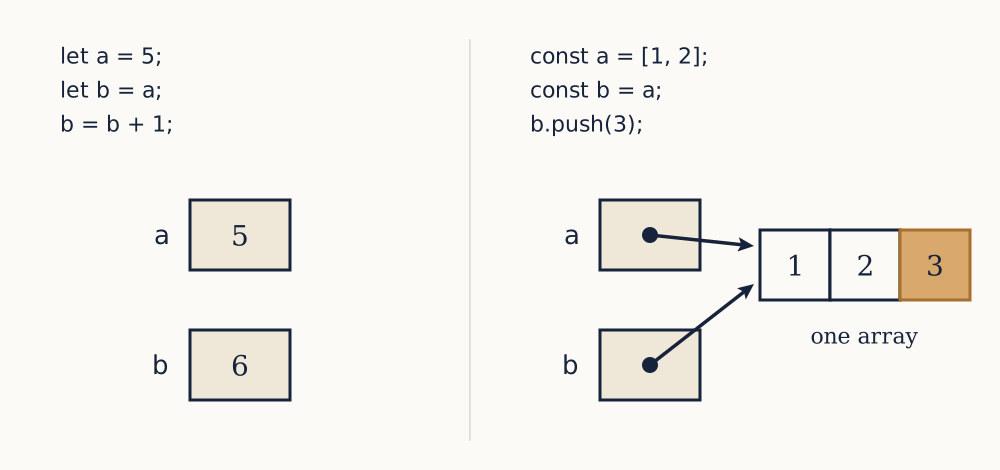
Two consequences follow immediately. === on arrays and objects compares identity, not contents: [1, 2] === [1, 2] is false because those are two separate arrays, while a === b above is true because there is only one. There is no built-in operator for "same contents", and comparing two objects field by field is something you write yourself or take from a library.
Why const does not freeze
The previous lessons said const prevents rebinding, and were precise for a reason:
const scores = [1, 2];
scores.push(3);      // fine, scores is [1, 2, 3]
scores = [4, 5];     // TypeError: Assignment to constant variable
const protects the note, not the thing. It guarantees that the name will always reach the same array, and says nothing about what is in it. That is why const is the right default for arrays and objects even when you intend to change their contents, and why const on its own is no defence against the bugs in this lesson.
Object.freeze(obj) does prevent changes, and comes with a warning that will be familiar by the end of this lesson: it is shallow. It stops assignments to the object's own keys and does nothing about objects nested inside it.
const f = Object.freeze({ a: 1, b: { c: 2 } });
f.b.c = 9;
console.log(f.a, f.b.c);
// 1 9
The write to f.a fails, throwing in strict mode and silently doing nothing outside it, while the write to f.b.c succeeds because the inner object was never frozen.
Passing to a function
The functions lesson said arguments are passed by value, and that is still true: the function gets a copy of the reference. Which means it cannot rebind the caller's name and can absolutely change the caller's data.
function addItem(list, item) {
  list.push(item);
}
function replaceList(list) {
  list = ["new"];
}

const basket = ["apple"];
addItem(basket, "pear");
replaceList(basket);
console.log(basket);
// ["apple", "pear"]
addItem reached through the reference and changed the one array. replaceList rebound its own parameter to a different array, which the caller never sees, and did nothing at all. Beginners frequently expect the opposite of both.
The dangerous version of this is a function that mutates by accident, and the usual culprit is sort:
function topThree(values) {
  return values.sort((a, b) => b - a).slice(0, 3);
}
const scores = [72, 85, 91, 60, 78];
console.log(topThree(scores));   // [91, 85, 78]
console.log(scores);             // [91, 85, 78, 72, 60]
topThree looks like a question, its name is a noun phrase, and it silently reorders the caller's array. Any code afterwards that assumed the original order is now wrong, and there is nothing at the failing line to suggest that topThree was responsible. Sorting a copy, [...values].sort(...), fixes it and costs one line.
Example. What does this print?
const original = [1, 2, 3];
const copy = original;
copy[0] = 99;
const other = [1, 2, 3];
console.log(original[0], original === copy, original === other);99, then true, then false. copy is another name for the same array, so writing through it is visible through original. other has the same contents and is a different array, so === is false. The two comparisons together are the whole lesson: identity, not contents.
Now you. What does this print, and how would you make scale leave its argument alone?
function scale(values, factor) {
  for (let i = 0; i < values.length; i++) {
    values[i] = values[i] * factor;
  }
  return values;
}
const prices = [10, 20];
const doubled = scale(prices, 2);
console.log(prices, doubled, prices === doubled);
Answer
It prints [20, 40] [20, 40] true. The loop writes through the reference, so the caller's array is changed and the returned array is the same one. To leave the argument alone, build a new array instead: return values.map(v => v * factor);, which returns a fresh array of the same length and touches nothing.
Copying, and how far the copy goes
Three ways to copy are worth knowing, and all three share one limitation.
For an array, [...values] or values.slice() produces a new array with the same elements. For an object, { ...obj } or Object.assign({}, obj) produces a new object with the same keys and values. These are shallow copies: the new container is genuinely new, and the values inside it are copied by the same rule as any assignment, so a nested array or object is shared rather than duplicated.
const orig = { name: "Ana", address: { city: "Lisbon" } };
const copy = { ...orig };
copy.name = "Ben";
copy.address.city = "Porto";
console.log(orig.name, orig.address.city);
// Ana Porto
The top level worked: orig.name is untouched. One level down it did not, because copy.address and orig.address are the same object. This is the single most common way for a "copy" to fail to be one, and the symptom is exactly the sort described at the top of this lesson: something changes that nobody wrote a line to change.
A deep copy duplicates every level. The modern way is structuredClone(value), built into browsers and into Node since version 17:
const deep = structuredClone(orig);
deep.address.city = "Madrid";
console.log(orig.address.city, deep.address.city);
// Porto Madrid
The older idiom, JSON.parse(JSON.stringify(value)), also produces a deep copy and carries all the JSON losses from the previous lesson: a Date comes back as a string, undefined values and functions vanish, and NaN becomes null. It also fails outright on a structure containing a cycle, where an object reaches itself, whereas structuredClone handles cycles correctly.
Deep copying is not free: it walks and rebuilds the whole structure, so copying a large tree on every update is a real cost. Most of the time a shallow copy at the level you are changing is the right amount of copying, which is what the next section is about.
Example. Why does this "copy" of a basket still change the original, and what is the smallest fix?
const basket = { id: 7, items: ["apple"] };
const backup = { ...basket };
basket.items.push("pear");
console.log(backup.items);
It prints ["apple", "pear"]. The spread copied two values: the number 7, which is a primitive and genuinely independent, and the reference to the items array, which is shared. The smallest fix is to copy the array too: const backup = { ...basket, items: [...basket.items] };. structuredClone(basket) also works and copies everything, which here is the same thing but would do more work on a larger record.
Now you. What does this print, and why?
const a = [1, [2, 3]];
const b = [...a];
b[0] = 99;
b[1].push(4);
console.log(a);
Answer
It prints [1, [2, 3, 4]]. The spread made a new outer array, so writing b[0] = 99 changed only b. The inner array was copied by reference, so b[1] and a[1] are the same array and the push is visible through both. One level of protection, exactly as advertised.
Changing a value, or returning a new one
Every function that works on data faces one choice: alter what it was given, or leave it alone and return something new. Both are legitimate, the mistake is being unclear about which you did.
The mutating style is values.sort(), list.push(x), obj.count = obj.count + 1. It allocates nothing, which matters for large structures and in tight loops, and it is the natural way to write a program that maintains state over time. Its cost is that the effect is invisible at the call site: process(data) gives the reader no clue that data is different afterwards.
The returning style is [...values].sort(), values.map(f), { ...obj, count: obj.count + 1 }. It allocates a new value each time, and buys three things. The caller's data is safe, so no function can break another at a distance. The old value is still available, which is how undo works and how you compare before with after. And the function becomes pure in the sense of the functions lesson, so it can be tested by calling it and looking at the result.
The default worth adopting, and it is what most current JavaScript does, is to return new values from anything that looks like a calculation and to mutate only where you are deliberately maintaining state, in a small and named place. Alongside it, three habits:
Say which in the name. sorted(values) returns; sort(values) alters. withItem(basket, x) returns; addItem(basket, x) alters. A reader should not have to open the function.
Never mutate a parameter unless that is the announced job of the function. This one rule prevents most of the bugs in this lesson.
Copy at the boundary. When your code receives data from somewhere it does not own, and intends to change it, copy first. When it hands data out, consider whether it minds the recipient changing it.
There is one trap this language avoids that is worth naming, because you may have heard of it. In Python, a default argument of [] is created once and shared between every call, so a function accumulating into it grows across calls. In JavaScript the default expression is evaluated fresh on each call, so function add(x, list = []) { list.push(x); return list; } gives [1] and then [2], which is what anyone would expect. Knowing that this differs between languages is more useful than knowing either rule alone.
Example. Rewrite this to return a new object rather than mutating, and say what each version costs.
function applyDiscount(order, percent) {
  order.total = order.total * (1 - percent / 100);
  return order;
}
function withDiscount(order, percent) {
return { ...order, total: order.total * (1 - percent / 100) };
}The mutating version allocates nothing and destroys the original total, so nothing downstream can show the price before the discount, and any other name reaching that order sees the new figure immediately. The returning version allocates one new object per call, keeps the original intact, and is safe to call twice by accident. For an order record the allocation is irrelevant and the safety is worth having. Note the name changed too, since the new function no longer applies anything.
Now you. function reset(config) { config.retries = 0; } is called with a shared configuration object used by three parts of a program. What goes wrong, and what would the returning version look like?
Answer
All three parts see retries become 0, because there is one object and reset reached it through the reference. Whichever part was relying on the old value now behaves differently, and nothing in its own code changed, so the bug appears to be in the wrong place entirely. The returning version is function withReset(config) { return { ...config, retries: 0 }; }, which gives the caller a new configuration and leaves the shared one alone. Only the caller that wanted the change gets it.
Being wrong, in three grades
That is the toolkit complete: values, decisions, loops, functions, arrays, objects, and an honest account of what a name holds.
Everything from here is about the other half of programming, which is that you will be wrong. Wrongness arrives in three grades, and they need different treatment. The code may not parse, and you find out immediately. It may parse and then stop mid-run, and you get a message and a stack trace pointing somewhere. Or, worst, it may run to completion and produce a confident wrong answer, like the shared configuration above. The next lesson is about the machinery for the first two, and what to do so that the third happens less often.